




In the previous article, we discussed Geofeed, RFC 8805, RFC 9632, RDAP, and why this matters to service providers.
Now let’s move on to the practical part.
The idea here is to set up a simple example of a geofeed publication using Registro.br, with a CSV file published over HTTPS and validation via WHOIS and RDAP.
To avoid using any actual blocks, the examples below use blocks reserved for testing and documentation. In production, of course, you should replace them with the actual ASN blocks.
Example Scenario
Let’s imagine that the provider has an IPv4 block /22 and uses each /24 in a different city.
For the IPv4 example, let’s use:
198.18.0.0/22This block is part of a space reserved for testing and benchmarking. It should not be used in production on the Internet. Here, it serves only to make the example look like a real-world operation, without exposing the prefix.
The operational breakdown would be:
198.18.0.0/24      Apucarana - PR
198.18.1.0/24      Londrina - PR
198.18.2.0/24      Sao Paulo - SP
198.18.3.0/24      Porto Alegre - RS
For IPv6, we’ll use the documentation block:
2001:db8::/32And break it down into /40:
2001:db8:0000::/40   Apucarana - PR
2001:db8:0100::/40   Londrina - PR
2001:db8:0200::/40   Sao Paulo - SP
2001:db8:0300::/40   Porto Alegre - RS
This approach is closer to the real world: a larger registered block, with divisions by city or region within it.
One file per block
For now, Registro.br maintains a more restrictive policy regarding the publication of geofeeds.
In practice, the safest approach is to work with one file per registered block, containing only that block or its subblocks.
So, if the registered block is:
198.18.0.0/22It makes sense to have a single file for this /22, containing the internal /24:
geofeeds_198.18.0.0_22.csvContents:
198.18.0.0/24,BR,BR-PR,Apucarana,
198.18.1.0/24,BR,BR-PR,Londrina,
198.18.2.0/24,BR,BR-SP,Sao Paulo,
198.18.3.0/24,BR,BR-RS,Porto Alegre,
Note the key point: all the lines are inside the ` 198.18.0.0/22` block.
This is different from combining independent blocks into the same file.
For example, if you had two different blocks registered with Registro.br, such as:
198.18.0.0/22
198.18.8.0/22
It wouldn’t be a good idea to put everything in the same CSV file right now. The safest approach would be to create a separate file for each block.
IPv6 Archive
For IPv6, following the same logic, the registered block would be:
2001:db8::/32The file could be named:
geofeeds_2001-db8_32.csvContents:
2001:db8:0000::/40,BR,BR-PR,Apucarana,
2001:db8:0100::/40,BR,BR-PR,Londrina,
2001:db8:0200::/40,BR,BR-SP,Sao Paulo,
2001:db8:0300::/40,BR,BR-RS,Porto Alegre,
The same rule applies here as well: the /40 are located within /32.
With a real provider, the granularity may vary. You can use /40, /44, /48, or another size, depending on how IPv6 was designed. The important thing is that the geofeed represents the operation consistently and does not attempt to be more precise than the network actually allows.
Correct CSV Format
RFC 8805 defines the base format of the geofeed [1]:
ip_prefix,alpha2code,region,city,postal_codeBut in a published file, you usually don’t include a header.
ip_prefix,alpha2code,region,city,postal_code
198.18.0.0/24,BR,BR-PR,Apucarana,
Here’s how to do it:
198.18.0.0/24,BR,BR-PR,Apucarana,Some important details:
The file must be in UTF-8.
The prefix must be in CIDR format.
The country of Brazil is BR.
The state must comply with ISO 3166-2. Paraná is BR-PR, São Paulo is BR-SP, and Rio Grande do Sul is BR-RS.
The city name should not contain a comma.
The ZIP code field should be left blank, but the final comma should remain.
Where to find state codes
For the region field, use ISO 3166-2.
BR-PR  Paraná
BR-SP  São Paulo
BR-RS  Rio Grande do Sul
BR-SC  Santa Catarina
BR-MG  Minas Gerais
BR-RJ  Rio de Janeiro
BR-DF  Distrito Federal
The official source is the ISO Online Browsing Platform [4].
For quick reference, the ISO 3166-2:BR page also lists the codes for Brazilian states [5].
Publishing the file
You can publish the CSV on the provider’s website, on a web server, in a public bucket, or using GitHub Pages.
The main point is that the URL needs to download the file directly.
Example for IPv4:
https://geo.seuprovedor.com.br/geofeeds_198.18.0.0_22.csvExample for IPv6:
https://geo.seuprovedor.com.br/geofeeds_2001-db8_32.csvOr, using GitHub Pages:
https://usuario.github.io/geofeeds/geofeeds_198.18.0.0_22.csv
https://usuario.github.io/geofeeds/geofeeds_2001-db8_32.csv
Be careful with links like these:
https://github.com/usuario/geofeeds/blob/main/geofeeds_198.18.0.0_22.csvThis link opens an HTML page on GitHub, not the file itself.
For Registro.br, the URL must serve the CSV file directly.
Example using GitHub Pages
A simple option for labs or small providers is to use GitHub Pages.
The flow is:
- create a GitHub account;
- create a repository named
geofeeds; - Create the file `
geofeeds_198.18.0.0_22.csv`; - put the CSV content into it;
- enable GitHub Pages in the repository;
- Access the generated public URL.
The IPv4 file would look like this:
198.18.0.0/24,BR,BR-PR,Apucarana,
198.18.1.0/24,BR,BR-PR,Londrina,
198.18.2.0/24,BR,BR-SP,Sao Paulo,
198.18.3.0/24,BR,BR-RS,Porto Alegre,
The final URL could look like this:
https://usuario.github.io/geofeeds/geofeeds_198.18.0.0_22.csvIf, when you open this URL, the browser downloads or displays only the CSV content, you’re on the right track.
If you open a GitHub page with a layout, buttons, a menu, and a preview, that’s wrong.
Content-Type
Registro.br can validate the type of content published.
Ideally, the server should respond with:
Content-Type: text/csvor:
Content-Type: application/geofeed+csvRFC 9877 defines the ” application/geofeed+csv ” type for geofeed files [3].
curl -I https://usuario.github.io/geofeeds/geofeeds_198.18.0.0_22.csvExample of an expected answer:
HTTP/2 200
content-type: text/csv
or:
HTTP/2 200
content-type: application/geofeed+csv
Validating the syntax
Before registering with Registro.br, it’s a good idea to run the file through a validator.
https://opengeofeed.org/validatorIt helps catch silly mistakes, such as:
- missing field;
- in the wrong format;
- invalid prefix;
- Malformed CSV;
- duplicate line;
- invalid country;
- incorrect use of “region.”
198.18.0.0/24,BR,PR,ApucaranaProblems:
PRIt should beBR-PR;- the final comma was missing;
- The number of fields is inconsistent.
198.18.0.0/24,BR,BR-PR,Apucarana,Configuring in Registro.br
After publishing and validating the file, go to the Registro.br portal.
- log in to the portal;
- access the Numbering section;
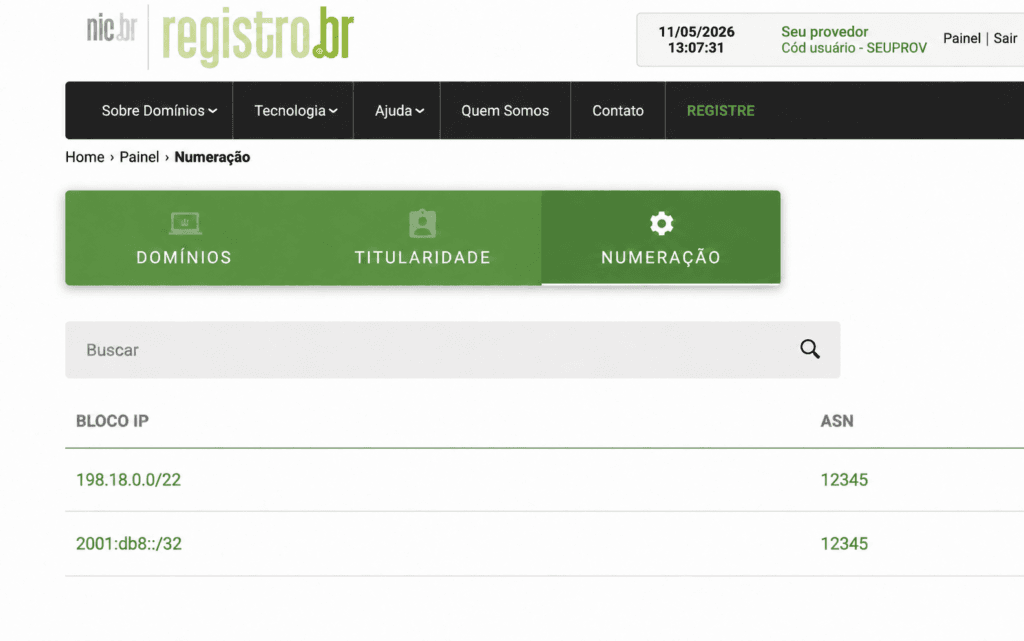
3. Select the block and open the ” Configure Geofeed” option;
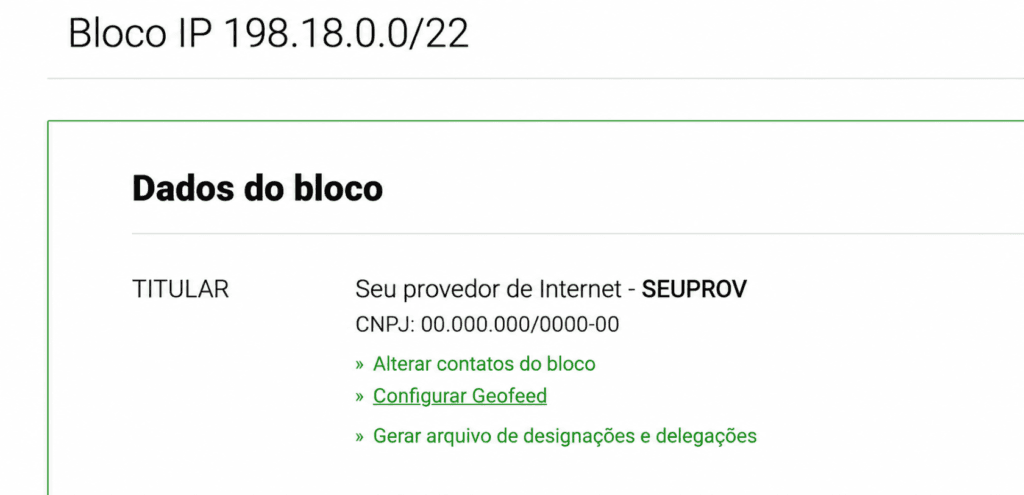
4. Enter the HTTPS URL of the file;

- save.

Bloco: 198.18.0.0/22
Geofeed: https://usuario.github.io/geofeeds/geofeeds_198.18.0.0_22.csv
IPv6 example:
Bloco: 2001:db8::/32
Geofeed: https://usuario.github.io/geofeeds/geofeeds_2001-db8_32.csv
Just a reminder: these blocks are only examples for documentation purposes. In production, you would use the actual blocks.
Checking WHOIS
After setting it up, check to see if the geofeed appears in WHOIS.
IPv4 example:
whois -h whois.registro.br 198.18.0.0 | grep -i geofeedExpected result:
geofeed: https://usuario.github.io/geofeeds/geofeeds_198.18.0.0_22.csvIPv6 example:
whois -h whois.registro.br 2001:db8:: | grep -i geofeedExpected result:
geofeed: https://usuario.github.io/geofeeds/geofeeds_2001-db8_32.csvIn a production environment, replace these with the actual IP addresses of the configured blocks.
Validating in RDAP
You can also validate it via RDAP.
curl -s https://rdap.registro.br/ip/198.18.0.0 | jq '.links[] | select(.rel == "geofeed")'Expected result:
{
  "rel": "geofeed",
  "href": "https://usuario.github.io/geofeeds/geofeeds_198.18.0.0_22.csv",
  "type": "application/geofeed+csv"
}
IPv6:
curl -s https://rdap.registro.br/ip/2001:db8:: | jq '.links[] | select(.rel == "geofeed")'Expected result:
{
  "rel": "geofeed",
  "href": "https://usuario.github.io/geofeeds/geofeeds_2001-db8_32.csv",
  "type": "application/geofeed+csv"
}
The RDAP is important because it is the most structured way for automated systems to discover the geofeed.
RFC 9877 was created specifically to standardize this geofeed link within RDAP responses [3].
Checking to see if it’s now discoverable
In addition to WHOIS and RDAP, GeolocateMuch is a useful tool:
https://geolocatemuch.com/?resource=198.18.0.0In a production environment, use the prefix or IP address.
This tool helps you verify whether the geofeed is being discovered based on public data.
Final Checklist
Before considering it complete, review:
[ ] Existe um arquivo por bloco cadastrado
[ ] O arquivo contém somente o bloco atual ou sub-blocos dele
[ ] O arquivo está em UTF-8
[ ] O arquivo está em CSV
[ ] Não existe cabeçalho
[ ] O prefixo está em CIDR
[ ] O país está como BR
[ ] O estado está no formato ISO 3166-2, exemplo BR-PR
[ ] A cidade não contém vírgula
[ ] O postal_code está vazio
[ ] A vírgula final foi mantida
[ ] A URL é HTTPS
[ ] A URL baixa diretamente o arquivo
[ ] O Content-Type é text/csv ou application/geofeed+csv
[ ] O arquivo passa no validador
[ ] O geofeed aparece no WHOIS
[ ] O geofeed aparece no RDAP
Common Mistakes
Combining different blocks in the same file
198.18.0.0/24,BR,BR-PR,Apucarana,
198.18.8.0/24,BR,BR-SP,Sao Paulo,
If the file is in the ” 198.18.0.0/22” block, the prefix ” 198.18.8.0/24 ” is outside of it.
Use the state without the country code
198.18.0.0/24,BR,PR,Apucarana,Correct:
198.18.0.0/24,BR,BR-PR,Apucarana,Forgetting the final comma
198.18.0.0/24,BR,BR-PR,ApucaranaCorrect:
198.18.0.0/24,BR,BR-PR,Apucarana,Use a GitHub preview link instead of the direct file link
https://github.com/usuario/geofeeds/blob/main/geofeeds_198.18.0.0_22.csvThat’s right, using GitHub Pages:
https://usuario.github.io/geofeeds/geofeeds_198.18.0.0_22.csvBest Operational Practices
Once you’ve set it up, don’t forget that it needs to be maintained.
Check the geofeed when:
- new block;
- fund transfer;
- activation of a new POP;
- relocation to another city handled;
- CGNAT reorganization;
- separation of prefixes by location;
- change in IPv6 usage;
- acquisition of or merger with another provider;
- Recurring complaints about incorrect locations.
Ideally, the information should come from a reliable source: IPAM, POP documentation, a block inventory, or the operation’s internal database.
A Geofeed built “off the top of your head” might work at first, but it becomes a problem as the network grows.
Conclusion
Setting up a geofeed on Registro.br isn’t complicated.
It’s the details that require attention.
One file per registered block.
Only the block or its sub-blocks.
CSV in UTF-8.
Direct download via HTTPS URL.
Country code in the ISO 3166-2 standard.
Validation via WHOIS and RDAP.
As a result, the provider will now publish an official feed so that geolocation users can better understand where their IP addresses are being used.
It doesn’t solve all geolocation problems overnight, but it puts the operation on the right track.
And, most importantly, it frees the ISP from having to simply react when a customer complains.
References
[1] RFC 8805 – A Format for Self-Published IP Geolocation Feeds
https://www.rfc-editor.org/rfc/rfc8805
[2] RFC 9632 – Finding and Using Geofeed Data
https://www.rfc-editor.org/rfc/rfc9632
[3] RFC 9877 – RDAP Extension for Geofeed Data
https://www.rfc-editor.org/rfc/rfc9877
[4] ISO Online Browsing Platform – ISO 3166 / Brazil
https://www.iso.org/obp/ui/#iso:code:3166:BR
[5] ISO 3166-2:BR – list of Brazilian state codes
https://en.wikipedia.org/wiki/ISO_3166-2:BR
[6] OpenGeofeed Validator
https://opengeofeed.org/validator
[7] GeolocateMuch — geofeed discovery test
https://geolocatemuch.com/
