In this article, we will discuss the importance of a Provider having its own DNS and the benefits that this can bring to the security, reliability and scalability of a company’s online services.
What is DNS?
DNS is an acronym for Domain Name System, that is, a domain name system, this system is distributed and hierarchical, in the course of this article we will better understand what we use it for and how it works.
Whenever you hear about names, domains, zones, it’s the DNS servers that will handle it. When you type your website in the browser, the path to reach the website is not done with the name but with an IP address, whether v4 or v6, and anyone who knows all these names and does this translation from name to IP address is the DNS server.
Sure, the DNS server translates a name into an IP so we can browse, but how does that work?
In Brazil, we have thousands of registered domains—websites you can visit. Imagine having to memorize the IP address for each one…
If I wanted to visit UOL, I’d have to use the address: 200.147.35.149
If I wanted to visit Google: 172.217.162.195
Or Facebook: 31.13.85.8
That would be pretty difficult, wouldn’t it? DNS makes this easier for us by functioning like a phone book.
In a phone book, we look up a person’s name and find their phone number—or even their address.
DNS is a list that contains all website names, and by searching for the name we want to access, we can find the website’s IP address, allowing us to navigate the internet to that site.
Whenever you access a website on your computer, it will make a query to find out the IP address of the website and you will be able to browse, it is done through a request that is sent to your recursive DNS server and it makes the Query. Let’s now understand what this recursive server is, its role and how it works…
Recursive DNS
For everything to work the way I explained, there are some types of DNS servers to be configured, recursive is one of them.
As I mentioned, when we type the name of the site in the browser, a query is made by the recursive server configured on your machine and then the server responds with an IP address for you to access the site. But how does he do it? Here comes the hierarchical and distributed system…
There are some servers on the internet that we call root servers; they are responsible for knowing the DNS servers that handle TLDs (top-level domains)—the first domains that appear on a website we want to access.
There are more than one type of TLDs, such as ccTLDs (country code top-level domains) and gTLDs (generic top-level domains).
The ccTLDs are top-level domains generally used for country identification, such as “.br” for Brazil. The gTLDs are generic top-level domains, as the name implies, an example is “.com”, “.org” and “.info” as well
We refer to the DNS servers responsible for top-level domains—whether country-code or generic—as authoritative servers; these are the ones recognized by the root servers. We’ll learn more about them later on.
But what about the subdomain of the website I want to access, like “facebook” from “facebook.com.br”? It has its own authoritative server, and the authoritative servers for the parent domains are the ones that will recognize it. The “.br” domain knows the “.com” domain, which knows “facebook.”
When you make a query to your recursive server, it knows the entire list of root servers that exist worldwide—there are several of them, distributed across the globe—and then the recursive server asks them if they know the address of the domain name we want to access. The root servers provide the path for the recursive server to reach the authoritative server for the TLD, where we discover the authoritative servers for the subsequent domains, until the recursive server identifies the authoritative server for the subdomain I want to access, and there I find the IP address of the domain name.
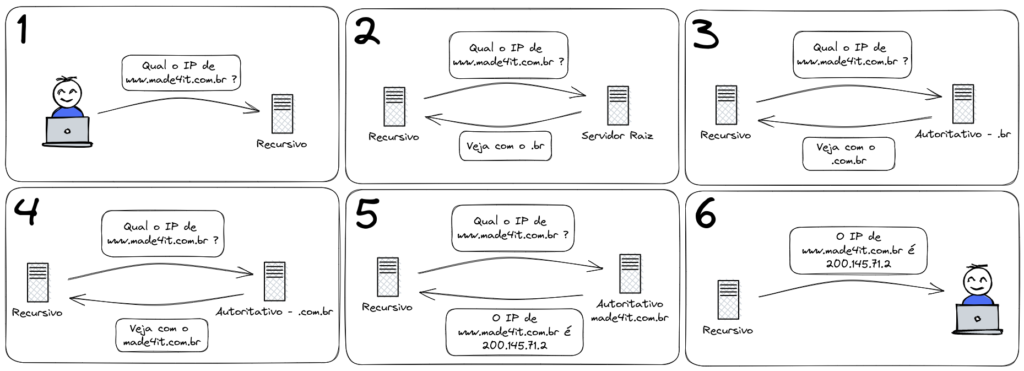
So when I access a website, the following steps are taken:
1 – Client queries its recursive DNS server to discover the IP of a website it wants to access;
2 – The recursive server asks the root server which server has authority over the name the client wants to access, and the root server provides the IP address of the authoritative DNS server for the TLD;
3 – The recursive server asks the TLD’s authoritative server for the IP address of the name, and it responds with the authoritative server for the next-level domain;
4 – Once again, the recursive server asks the domain’s authoritative server for the IP address of the name we want to access, and it responds with the authoritative server for the subdomain.
5 – Finally, the recursive server asks the authoritative server of the subdomain which is the IP address of the name and is answered with the IP of the site we want to access.
6 – With the IP address provided by the authoritative server, the client responds recursively.
Authoritative DNS
In the explanation about recursive, we talked about an authoritative server, but what is an authoritative DNS server?
When we talk about an authoritative server, we are referring to the server where domain names are registered along with their IP addresses; these are the servers that have authority over the domains, which are sometimes also called zones.
For example, we at Made4it have the domain “made4it.com.br/,” and this domain is managed on an authoritative server. So when someone needs to find our website’s IP address, the recursive DNS server that was queried will follow the entire path until it reaches our authoritative server to receive the response with the IP address. The IP address that will be passed to the recursive server is determined by the “record” we configured in our DNS service within the authoritative server. The record, as the name suggests, specifies which IP address we need to reach in order to access that domain name.
But the function of notes does not stop there, there are also other types. The note that says the IPv4 of a name is type A, the one that says the IPv6 of a name is type AAAA, we can also point a name to another name that would be the CNAME type, among other different types each for its due functionality.
There are services online where we can register our own domain, such as“made4dns.com.br.”As I mentioned earlier, when we have a domain, we need an authoritative server to manage it.
You have the option of using your own authoritative server, or you can manage the domain through an authoritative server located on the internet—usually provided by the company where you registered the domain, or through specialized services that can be contracted.
An authoritative server can also handle reverse domains, in which case it may also be called a reverse server. We’ll explore this in more detail in the next section.
Reverse DNS
A reverse server is nothing more than an authoritative DNS server. It can be configured to handle only reverse domains, or it can handle both reverse and “normal” domains together; both configurations work just fine, so there’s no need for two separate servers.
But what are these reverse domains? We use them to determine the name associated with an IP address.
That’s right—the name associated with the IP address. When we type a website into the browser, we look up the name to find out its IP address. Now, when we talk about reverse DNS, we look up an IP address to find out its name—that’s why it’s called “reverse.”
The reverse domains are used to facilitate the diagnosis of problems, since they are consulted in tests such as when we use “traceroute” or some other program of the type. They also serve for validations in e-mail services, bringing greater security when there is an e-mail server that owns the domain.
The importance of a provider having its own DNS
We always see recommendations regarding an internet provider having its own DNS server so that its end customers can browse the internet in a better way, in this case we are talking about recursive since we use it to browse, but why is that?
A provider always seeks to provide the best quality internet for its customers, and a very important factor for us to be able to browse the internet is to have a recursive DNS server configured, the reason for this and how it works we already understand, but how to have a server within your network will improve navigation for your customers even more?
When we send a request to a recursive server, we need to reach that server in order to make the request, and when using external servers like the well-known “8.8.8.8” (Google’s recursive DNS server), we have to go out onto the internet and travel the entire path to Google’s server where it runs its recursive server; then that server performs the lookup to find the IP address of the website we need to access, after which the response travels all the way back along the path we took, and only then can we access the website. But imagine the entire path we take on the internet just to reach Google’s server—and then having to go all the way back…
With a server within the provider’s own infrastructure, we shorten the path, making our browsing faster because we’ll get a quicker response.
Furthermore, when we have our own server, we don’t have to rely on our upstream provider to use DNS, since we don’t need to go through the internet to make our request; therefore, if there’s a problem with the connections, it won’t affect the DNS.
This happens because when the recursive server makes a query to determine the IP address of a website we want to access, it may either need to look up that information or already have it stored—which is what we call cache, that is, when we consult a website for the first time, it goes all the way between the root servers and the authoritative servers of the TLDs, but for the second time he already knows the site’s IP because he already had to look it up, so when that answer is in cache One of the steps is skipped, and our question is answered even faster.
With our own recursive server and a well-configured cache, we are able to respond to customers with the IP of a website they want to access more quickly and efficiently, thus improving their navigation.
In this article, we’ve learned what DNS is, the different types of DNS, and why you should have a DNS server in your infrastructure. If you still have questions about this, need support with your DNS server, or want to set up your own DNS, Made4it is here to help.
Written by: