




Hello,
Here are this week’s news and updates for our NetFlow-based traffic analysis software, Made4Flow:
Dashboard – Total Traffic

With the new Dashboard you can get an overview of the Inbound (Download) and Outbound (Upload) traffic of your infrastructure.
Interface-by-Interface Chart
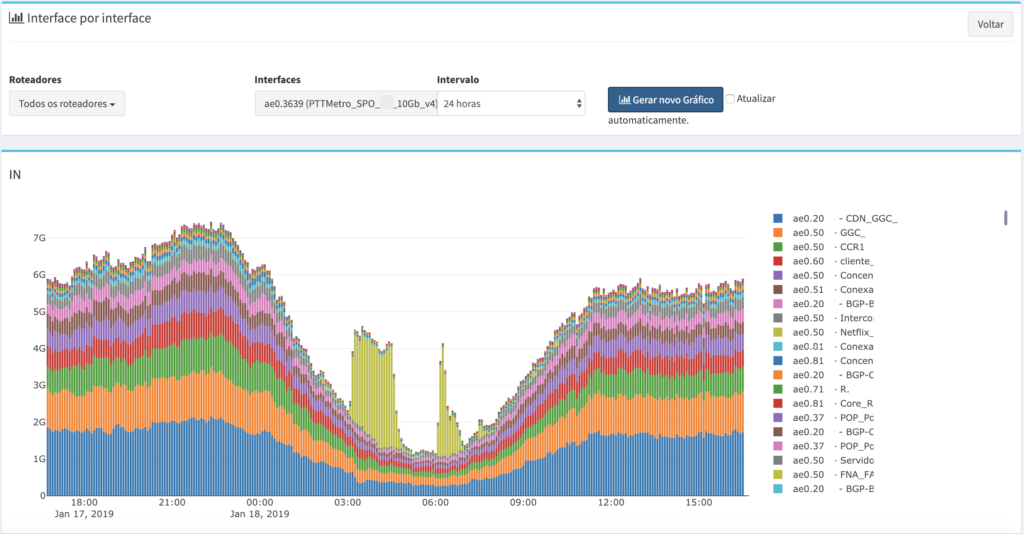
With this new graph, you can identify which interface the traffic was routed to, which helps you determine how much traffic your network or your ASN consumed from a circuit.
Filters on the Raw Data Report

With the Raw Data Report filters it is now possible to filter traffic from only one IPv4 or IPv6, Port, ASN or any other field within the report.
Multiple Routers
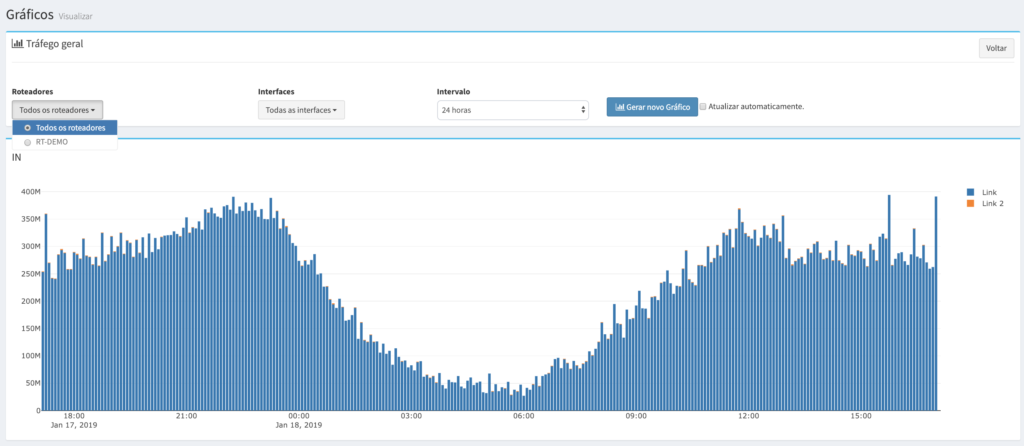
Now you can view information about all your routers on a single graph, which helps you get a quicker overview of your traffic.
You can select multiple routers in all the Charts.
And they were also updated
- Search field in all Prefix, ASN and Interface filters
- SNMP alias information has been added to the chart legends.
- Improved performance of graphics over a 24-hour time interval
- Backend Software Update
See you next time with more news!
