


Blackhole—or, literally, “black hole”—is a technique that discards packets destined for a specific IP address or range of IP addresses at an Internet Service Provider’s edge routers (BGP). Once a DDoS attack is detected, Blackhole can be used to drop all traffic destined for the attacked IP address or range of IP addresses, thereby protecting the network from overload or shutdown due to the volume of DDoS traffic.
RTBH, or Remote Triggered Blackhole, is a technique that uses BGP to easily drop traffic destined for the targeted IP address at the backbone or at the BGP layer, thereby preventing the entire network from going down or experiencing performance degradation due to a DDoS attack.
To make the explanation easier let’s give an example: The provider XPTO has the prefix 200.200.200.0/24 associated with its ASN123456, and within this provider there is a company Bubble that suffered a DDoS attack, so that the provider’s network XPTO not stop completely, they add the configuration of blackhole for this company Bubble, thus protecting your infrastructure and leaving only the company Bubble without services
What are the pros and cons?
Pros:
- Efficient against DDoS attacks
- Its deployment is very simple and fast
- Support for all vendors (equipment brands)
- Widely deployed in Operators of all sizes
Cons:
- The blackhole IP stops working completely
- In attacks directed to several IP’s it can generate more problems than solutions
How does Blackhole work in practice?
As soon as the attack is detected—either through NetFlow analysis (Made4Flow is an example of NetFlow analysis software) or via a port mirror—and the destination IP address of the DDoS attack is determined, you can configure the router to send the route to a blackhole or, more specifically, to Null0 (on Cisco/Huawei routers) or Discard (Juniper) or Blackhole (Mikrotik), literally sending that route to the “black hole” and thereby discarding the traffic destined for that IP address.
In the world of BGP it is possible to send this Blackhole route to your carrier so that it can discard the packets within its network and also send it to all the carriers so that the whole world knows that this IP no longer works. We will show later how Blackhole works in the BGP world.
How to configure the Blackhole?
After determining the attacked IP the Router operator accesses the equipment, configures a static route with the Attack destination IP being its next-hop (or gateway) as Null0 or Blackhole
An example of a configuration on Huawei routers uses the following syntax:
[~rt-huawei-ne40]ip route-static 200.200.200.200 32 NULL 0
Explanation of the command: All packets destined for IP address 200.200.200.200 will be sent to Null0 (Blackhole), and thus all traffic to that address will be discarded.
You still need to advertise this blackhole route via BGP so that your ISPs receive it and also discard traffic destined for that compromised IP address. To make this clearer, the image below illustrates the entire blackhole advertising process.
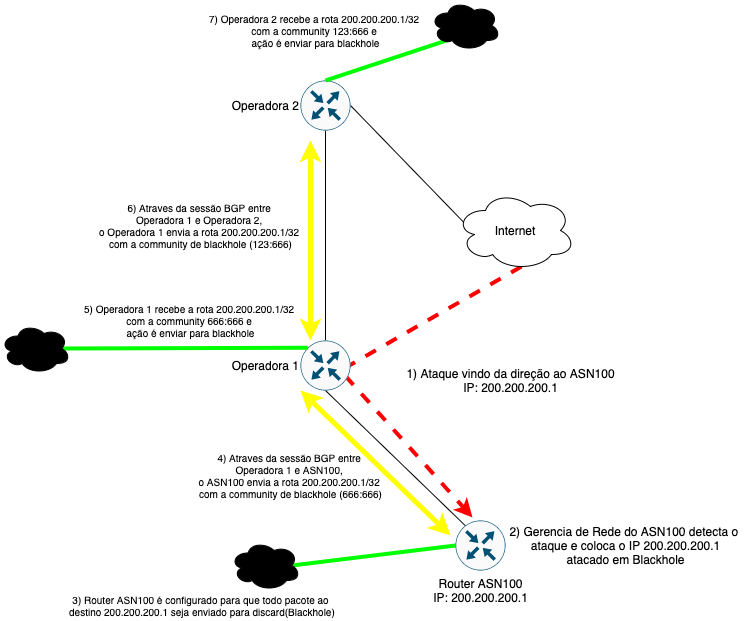
In the following articles we will show you how to configure Blackhole on Huawei, Cisco, Juniper, and Mikrotik routers.
If you have any questions, please contact us on social media or via WhatsApp!
Until the next articles!
