




Hello
Today we’ll show you how to configure your Cisco router to export NetFlow.
Here we have the Network topology and the Netflow Server information
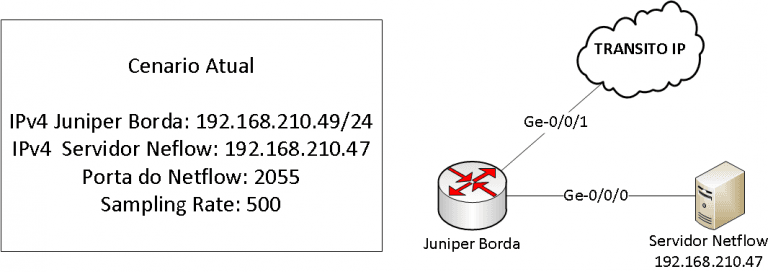
These are the steps required to configure the Cisco ASR9k Router to export Netflow v5/v9
- Configure Flow Exporter-Map
- Configuring the Sampler-Map
- Configure Monitor-Map for IPv4 and IPv6
- Configure the interface to enable Netflow on the interface
Let’s go to the step-by-step configuration
1. Configure Flow Exporter-Map
Configure the Flow Exporter-Map where we tell you the Netflow Server IP, port, Netflow version and other information, following the example:
flow exporter-map MADE4FLOW-EM
 destination 192.168.210.47
 source ge-0/0/0
 transport udp 2055
 version v9
 options interface-table
 template data timeout 60
 options interface-table timeout 60
 exit
2. Configuring the Sampler-Map
The sampler-map will tell the Cisco ASR9k Router the sampling values to send to the Netflow Collection Server
sampler-map MADE4FLOW-SM
 random 1 out-of 500
 exit
In this example we are randomly exporting 1 of 500 packages.
By using sampling, you reduce the load on your router’s CPU, thereby conserving resources.
3. Configuring Monitor-Map for IPv4 and IPv6
The next step is to configure Monitor-map to specify which type of protocol we will collect and which exporter we will use.
For IPv4 use
flow monitor-map MADE4FLOW-FMM
 record ipv4
exporter MADE4FLOW-EM
 cache entries 800000
 cache timeout active 60
 cache timeout inactive 15
exit
For IPv6
flow monitor-map MADE4FLOW-FMM-v6
 record ipv6
 exporter MADE4FLOW-EM
 cache entries 800000
 cache timeout active 60
 cache timeout inactive 15
exit
4. Configure the interface to enable Netflow on the interface
To enable your router to collect information it is necessary to enable the Flow command on all interfaces, use the following commands to enable in IPv4 and IPv6
interface Gi0/1
  flow ipv4 monitor MADE4FLOW-FMM sampler MADE4FLOW-SM ingress
  flow ipv6 monitor MADE4FLOW-FMM-v6 sampler MADE4FLOW-SM ingress
All configuration used
flow exporter-map MADE4FLOW-EM
 destination 192.168.210.47
 source ge-0/0/0
 transport udp 2055
 version v9
 options interface-table
 template data timeout 60
 options interface-table timeout 60
 exit
sampler-map MADE4FLOW-SM
 random 1 out-of 500
 exit
flow monitor-map MADE4FLOW-FMM
 record ipv4
 exporter MADE4FLOW-EM
 cache entries 800000
 cache timeout active 60
 cache timeout inactive 15
 exit
flow monitor-map MADE4FLOW-FMM-v6
 record ipv6
 exporter MADE4FLOW-EM
 cache entries 800000
 cache timeout active 60
 cache timeout inactive 15
interface Gi0/1
 flow ipv4 monitor MADE4FLOW-FMM sampler MADE4FLOW-SM ingress
 flow ipv6 monitor MADE4FLOW-FMM-v6 sampler MADE4FLOW-SM ingress
Netflow on Cisco ASR100x (1002, 1006, 1008)
If your router is from the Cisco ASR100x series (1002, 1006, 1008), use the commands below:
flow exporter MADE4FLOW
 destination 192.168.210.47
 transport udp 2055
 source tenGigabitEthernet 0/3/0

!

flow monitor MADE4FLOW_monitor
 exporter MADE4FLOW
 cache timeout active 60
 record netflow-original

!

sampler 1of500
 description sampler de 1 para 500
 mode random 1 out-of 500
On each interface of your router, run the following command
ip flow monitor MADE4FLOW_monitor sampler 1of500 input
Below is the total configuration for the Cisco ASR100x Line (1002, 1006, 1008)
flow exporter MADE4FLOW
 destination 192.168.210.47
 transport udp 2055
 source tenGigabitEthernet 0/3/0
 !
 flow monitor MADE4FLOW_monitor
 exporter MADE4FLOW
 cache timeout active 60
 record netflow-original
 !
 sampler 1of500
 description sampler de 1 para 500
 mode random 1 out-of 500
ON EACH INTERFACE, ADD THE FOLLOWING COMMAND: `
` `ip flow monitor MADE4FLOW_monitor sampler 1of500 input`
If you have any questions, feel free to contact us via WhatsApp, email, or phone
WhatsApp: +55 43 9 8485-4013
Email: suporte@made4flow.com.br
Phone: +55 43 3047-8300
See you next time
