




Check out what’s new in Made4Flow 2.11.1: export NetFlow V5, V9, and sFlow to DDoS mitigation platforms, configure alerts by router, and integrate with external systems via REST API.
Anyone who operates a medium- or large-scale network knows that traffic visibility isn’t a competitive advantage—it’s a matter of survival. Identifying an ongoing DDoS attack, determining which country the anomalous traffic is coming from, or integrating the NetFlow analyzer with the carrier’s mitigation platform without having to reconfigure routers: these are real day-to-day challenges for NOC and security teams.
Version 2.11.1 of Made4Flow, available starting February 27, 2026, addresses precisely these needs. In this article, we detail each new feature and what it accomplishes in practice.
What is Made4Flow, and who is this update for?
Made4Flow is a NetFlow and sFlow analyzer developed by Made4it for internet service providers, telecom operators, and NOC teams that need detailed visibility into network traffic. It collects flows exported by routers (NetFlow V5, V9, sFlow, IPFIX), applies intelligence to this data, and delivers real-time graphs, alerts, and analytics.
This update is particularly relevant for those who:
- It uses third-party DDoS mitigation platforms and needs to send traffic to them
- It suffers from data distortion caused by sampling rate incompatibility in the routers
- Do you want to identify the geographic origin of suspicious traffic without using external tools?
- You need to integrate Made4Flow with other systems via API
How to Export NetFlow to a DDoS Mitigation Platform — Without Configuring the Routers
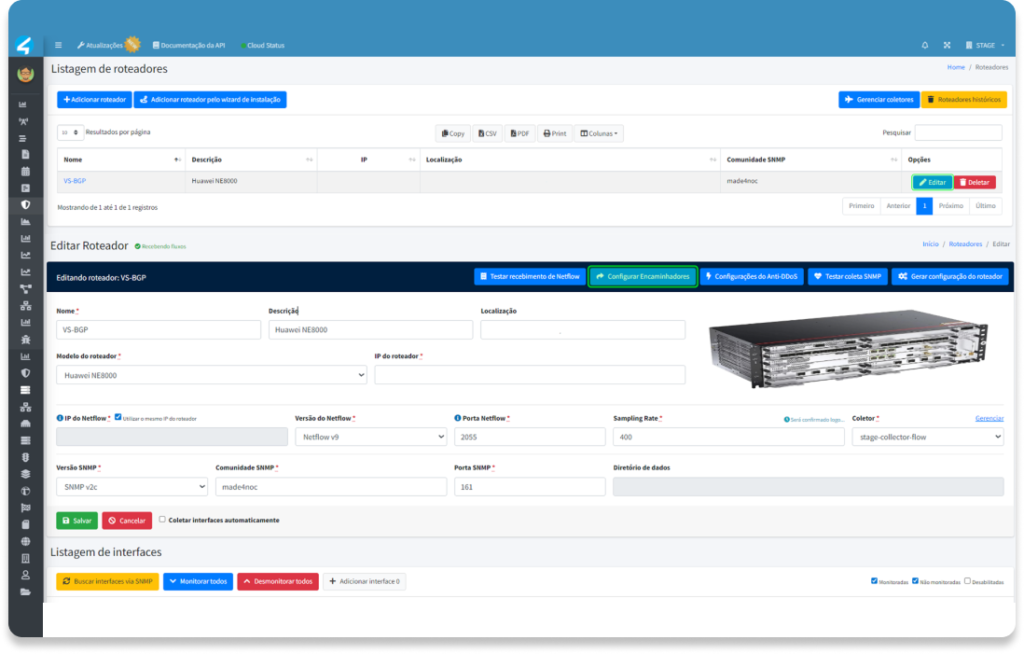
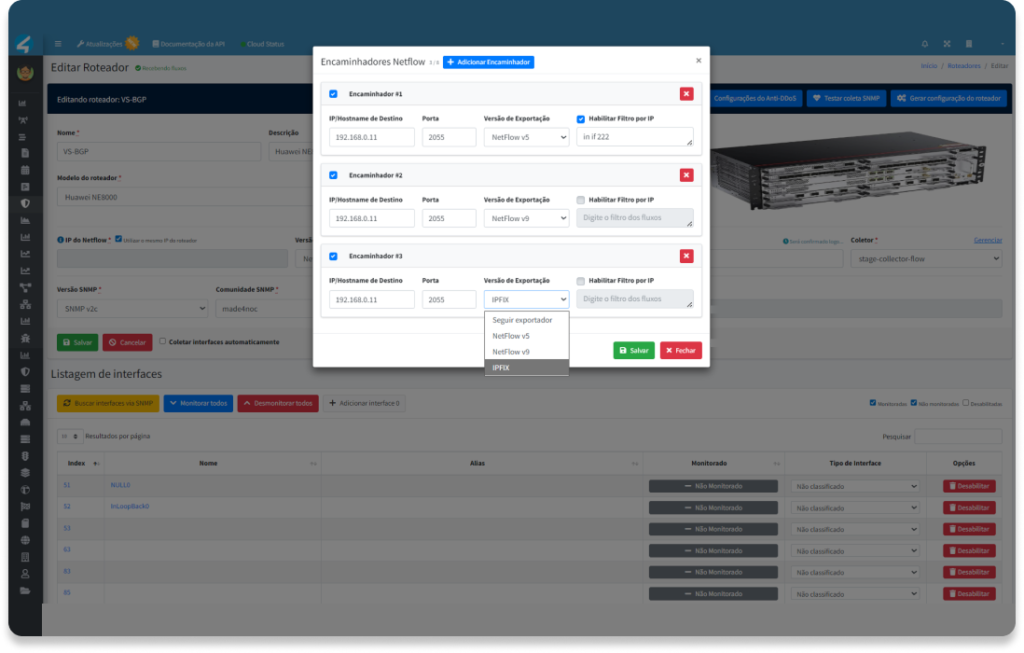
This is the most eagerly awaited new feature in version 2.11.1 for teams that operate DDoS mitigation platforms.
The previous scenario was as follows: to send flows to a third-party mitigation solution, you had to configure the router to export simultaneously to two destinations—the Made4Flow collector and the mitigation platform’s collector. In many environments, this is not simple, is risky, or is simply unfeasible.
With Made4Flow’s new flow replicator, the router continues to export flows to Made4Flow as usual. From there, the platform itself replicates and forwards the flows to any external destination in the following formats:
- NetFlow V5
- NetFlow V9
- IPFIX
- sFlow
Configuration is performed directly through the Made4Flow interface—no downtime, no maintenance window on the routers, and no operational risk.
For service providers using solutions such as Wanguard, NSFOCUS, Arbor, or any other platform that uses NetFlow or sFlow, this feature eliminates a complex dependency and speeds up integration.
Integrate your DDoS mitigation platform with Made4Flow and replicate NetFlow V5, V9, IPFIX, or sFlow with just one configuration.
Threat Analysis: New Visualization to Identify Internal Attacks
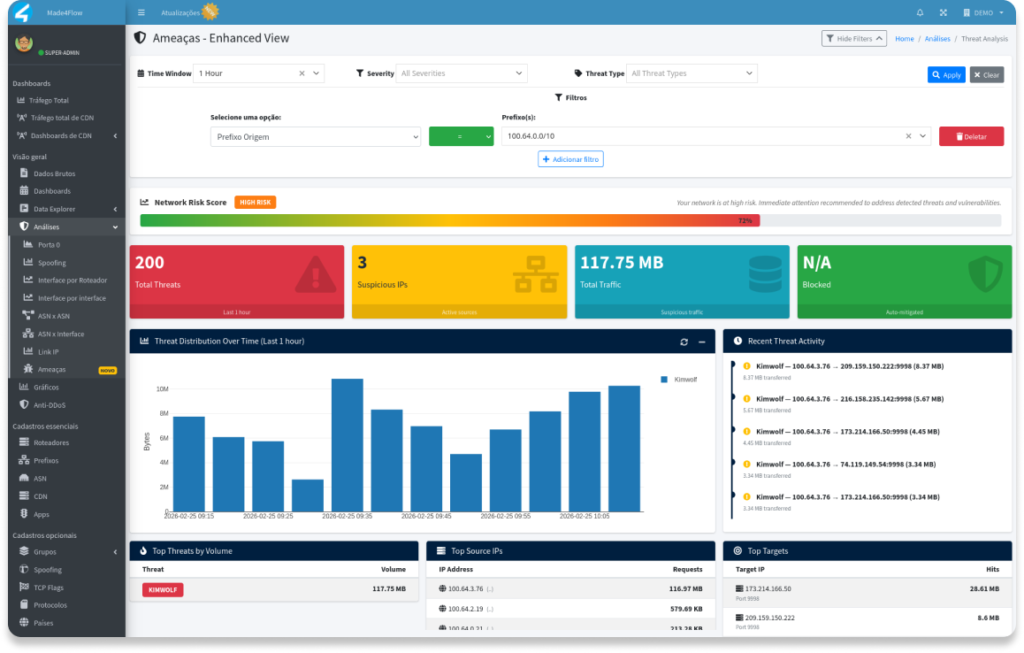
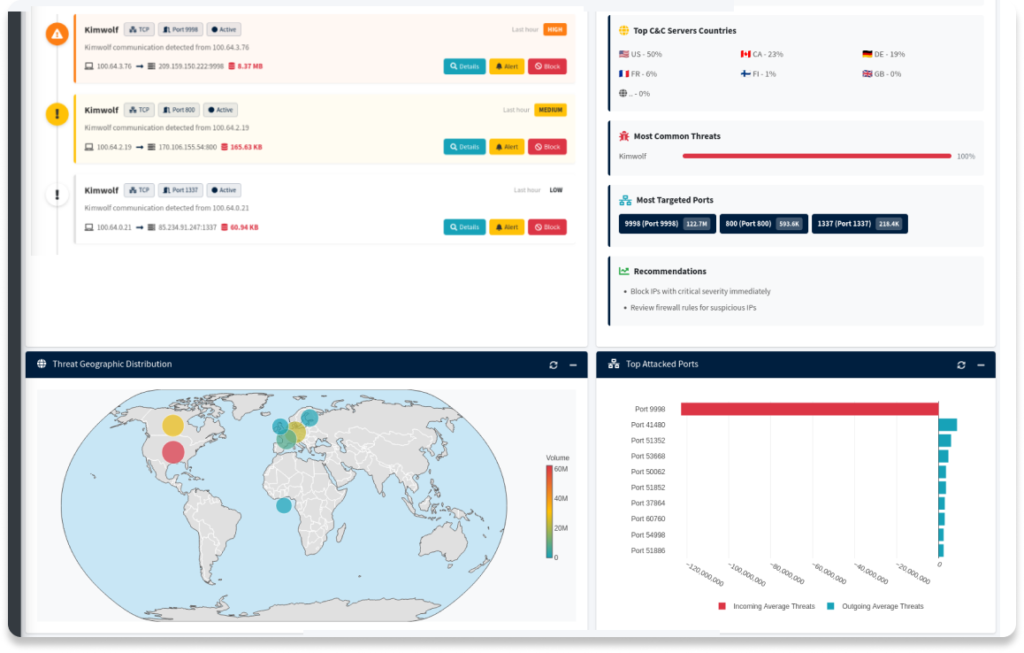
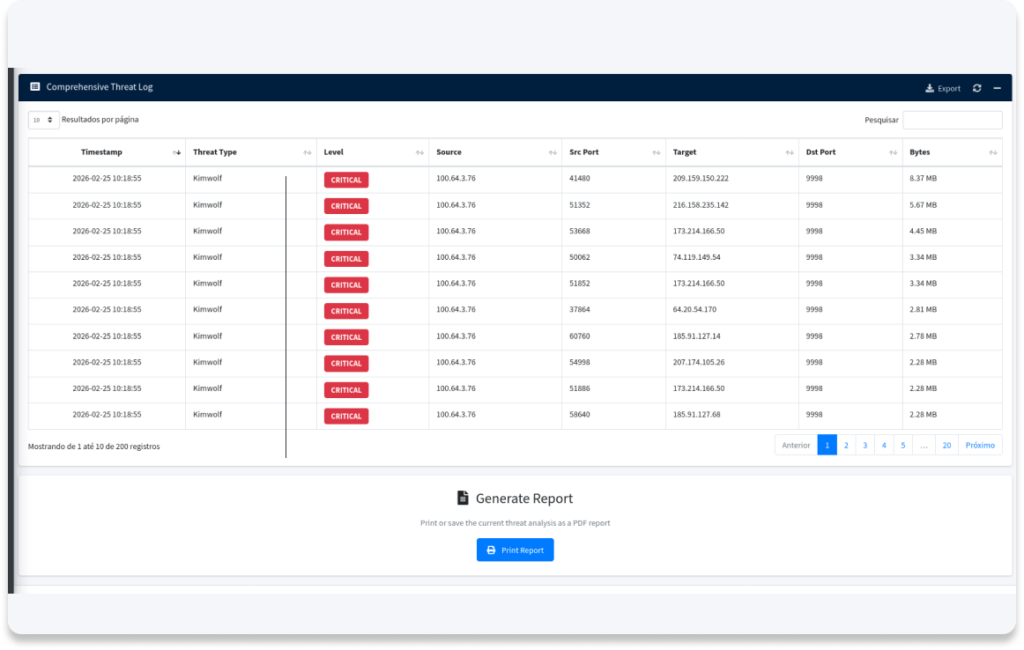
The Made4Flow Threat Analysis page has been completely redesigned in version 2.11.1.
The new layout consolidates the key security metrics on a single screen: total detected threats, suspicious IP addresses, volume of malicious traffic, temporal distribution of incidents, and the main targets. The geographic view of threats has also been enhanced, making it easier to correlate the attack’s origin with its impact on the network.
For security teams that need to respond quickly to incidents, this means fewer clicks and more context available at the critical moment.
Find out who is launching attacks within your internal network with just ONE CLICK.
Sampling Rate and Router Alerts: Stop Analyzing Distorted Data
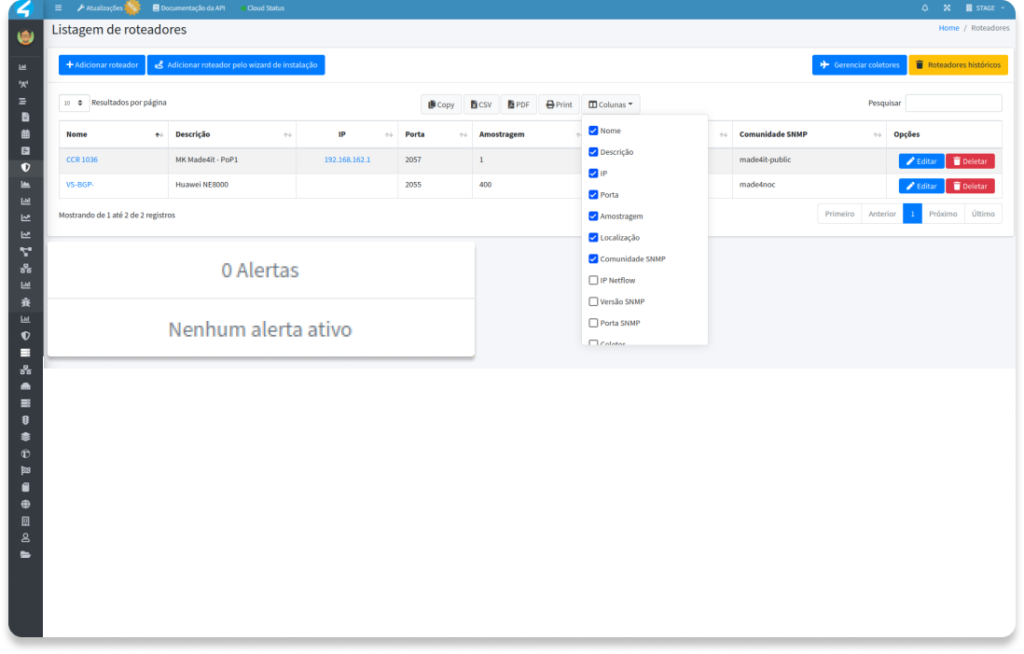
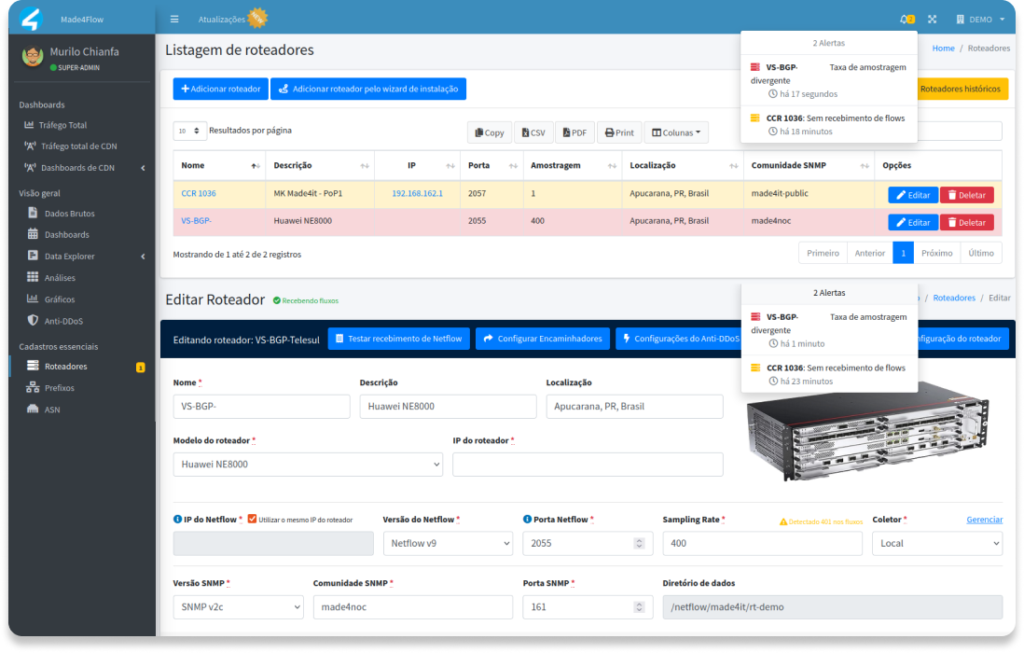
One of the most subtle issues in NetFlow monitoring is sampling rate incompatibility. When the value configured in the analysis tool differs from the one the router is actually using, all traffic graphs become distorted—and the team may make decisions based on incorrect data without realizing it.
Version 2.11.1 adds two types of alerts specific to this scenario:
Sampling Rate Incompatibility Alert
It automatically notifies you when the sampling value configured in Made4Flow differs from what the router is reporting. This is especially useful in environments with multiple routers from different manufacturers (Cisco, Huawei, MikroTik, Juniper), where the sampling pattern may vary.
Explicit alerts by router
Each router registered in Made4Flow can now have its own active alerts, which are visible directly in the device list and on the edit page. This simplifies management in environments with dozens or hundreds of monitored routers.
Get notified before the problem affects your data—set it up in minutes.
Traffic by Country and App by Prefix: Real-Time Geographic Visibility
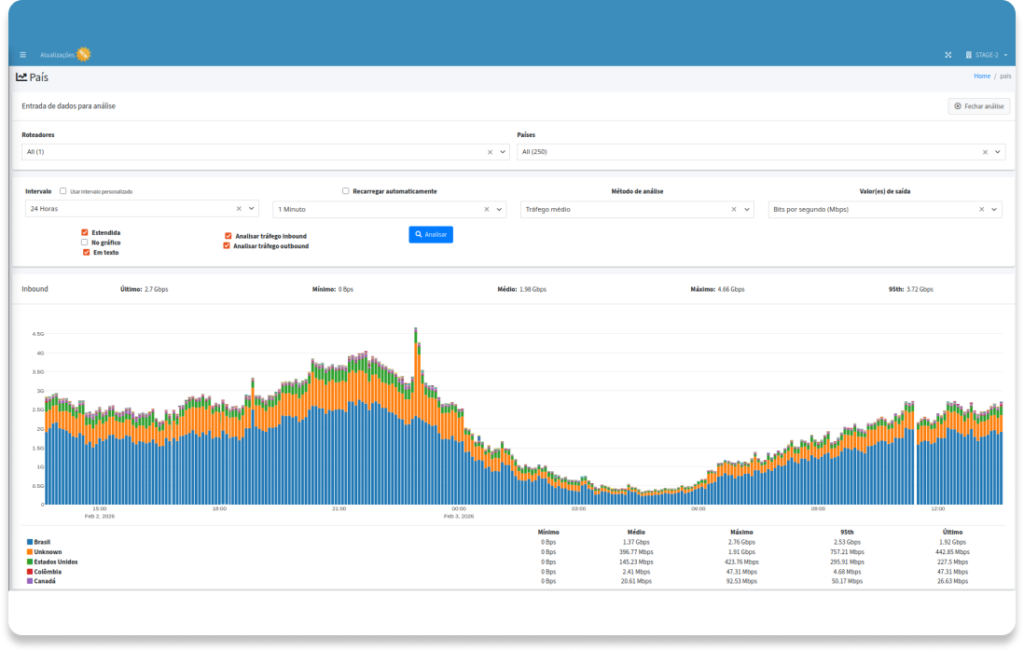
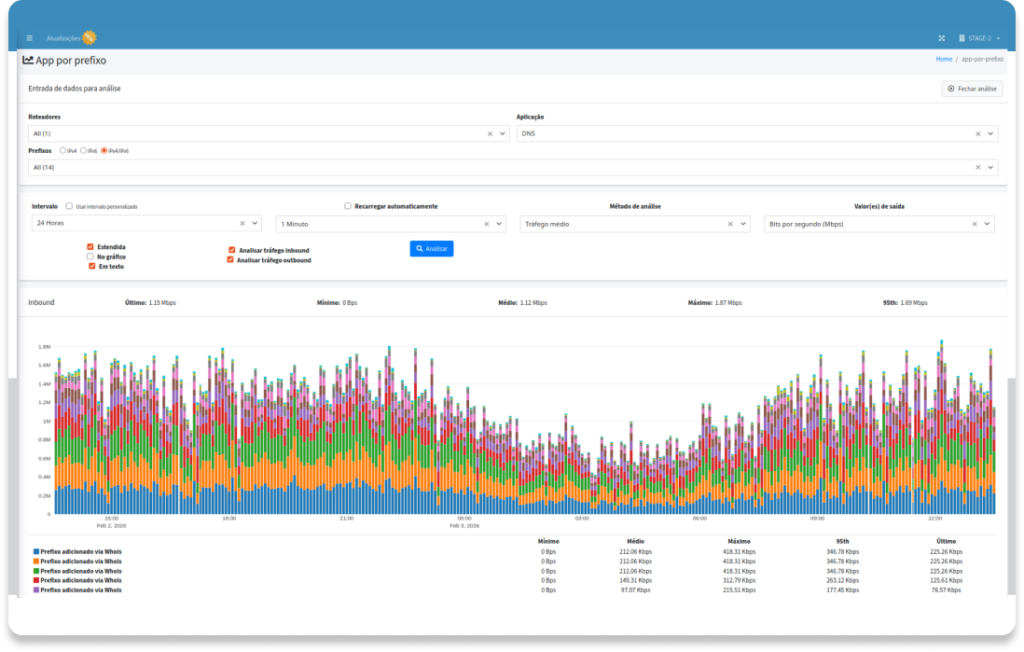
For internet service providers and telecom operators, knowing where traffic comes from is just as important as knowing how much traffic there is. A spike originating from a particular country may indicate a volumetric attack in progress; a specific prefix consuming an unusually high amount of bandwidth may signal that a customer’s system has been compromised.
Version 2.11.1 adds a new overview screen with traffic charts broken down by:
- Country of Origin/Destination: Inbound and outbound traffic volume by country, with historical data
- App by prefix: traffic segmented by the network prefix associated with the application or client
This visibility was available in the raw data, but now it is presented in a native visual format, eliminating the need to export data, cross-reference spreadsheets, or use external tools.
See in seconds which country or prefix is generating unusual traffic—and take action before the attack escalates.
Aggregation by TCP Flags and Countries: Accurately Detect DDoS Attack Patterns
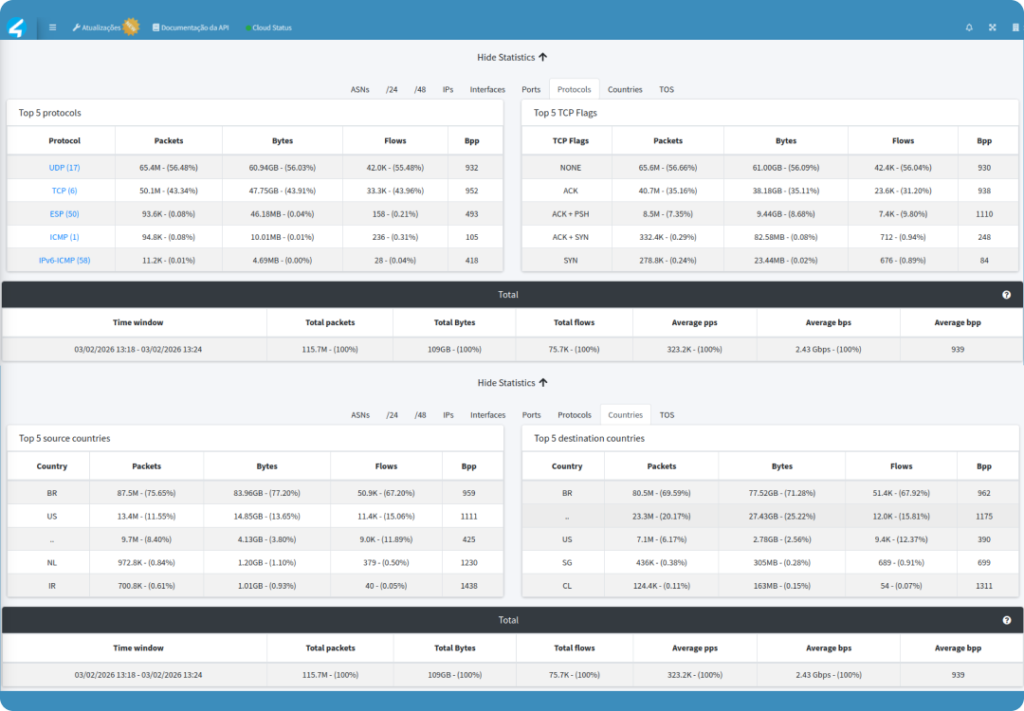
Modern DDoS attacks often masquerade as seemingly normal traffic. Analyzing TCP flags—such as SYN, ACK, or RST floods—is one of the most effective ways to identify malicious traffic before it impacts services.
Version 2.11.1 adds new aggregation tabs to the Made4Flow raw data:
- TCP Flags: aggregates traffic based on the flags present in the flows, making it easier to identify patterns such as SYN floods, ACK floods, and RST floods
- Countries: aggregates traffic by country of origin/destination directly in the raw data, at the flow level
For security teams investigating incidents, the combination of analysis based on flags and geographic origin is particularly powerful for correlating attack techniques with their source.
Identify attacks based on TCP flag patterns and geographic origin in seconds, without external tools.
Made4Flow REST API: Integrate with Any System
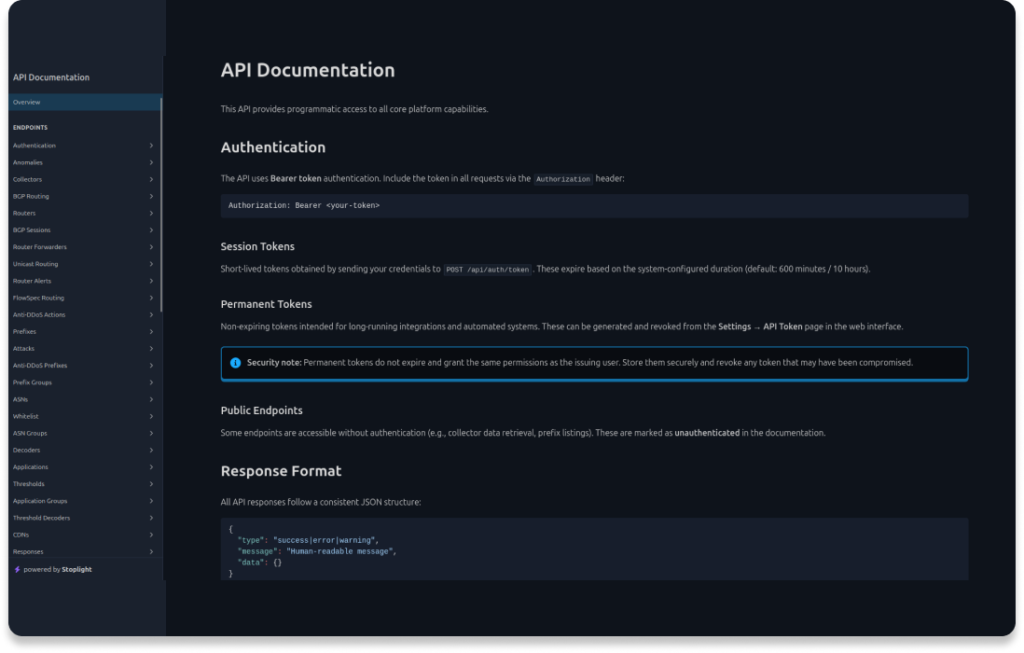
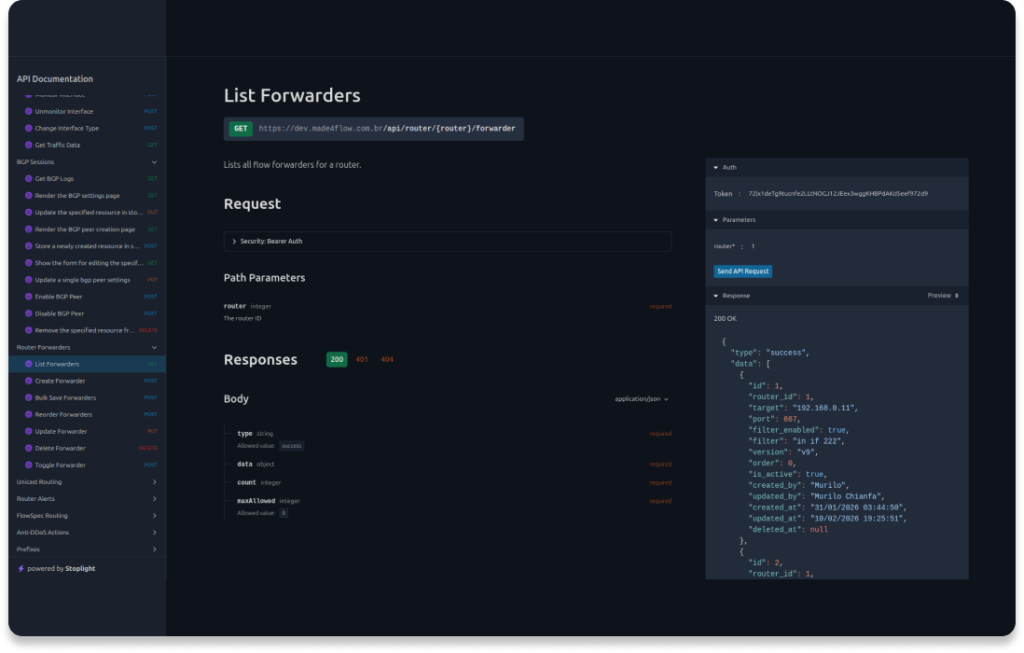
Version 2.11.1 marks the arrival of Made4Flow’s official REST API, opening up the platform for programmatic integrations with other systems.
The API offers:
- Bearer token authentication — with support for session tokens and persistent tokens for long-running integrations
- Documented endpoints — with interactive documentation available directly in the Made4Flow interface
- Access to key resources — traffic data, router and switch configurations, and much more
In practice, this enables integrations with Zabbix, Grafana, ticketing systems, SIEM, external dashboards, and any system that retrieves data via HTTP.
Connect Made4Flow to your ecosystem and automate network data using your own stack.
Other improvements in version 2.11.1
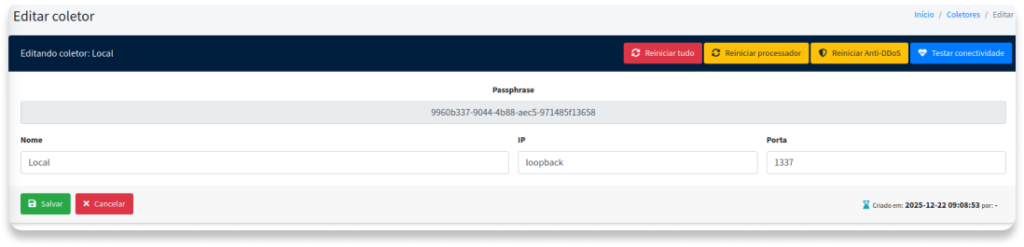
- Restarting processors via the UI: Restart all processors directly from the interface, without accessing the server.
- CNPJ/CPF field in the setup wizard: makes onboarding easier for Brazilian customers.
- Retry mechanism for enrichment: temporary failures in geolocation or ASN resolution no longer result in data gaps.
- Log rotation with append-based logging: prevents files from becoming excessively large in environments with a high volume of flows.
- Improved predictability of routers and forwarders: more consistent behavior in environments with multiple active collectors.
Fixes in Version 2.11.1
- MIB for ifAlias retrieval: Fixed the reading of interface aliases via SNMP for a specific exporter.
- ASNs by interface: Fixed an issue where some interfaces were not generating traffic data by ASN correctly.
- InfluxDB Query Performance: Optimized queries that were causing slowdowns in some charts in high-volume environments.
Frequently Asked Questions About Made4Flow 2.11.1
Can Made4Flow export NetFlow data to my DDoS mitigation platform?
Yes. Starting with version 2.11.1, Made4Flow includes a native exporter that replicates flows in NetFlow V5, NetFlow V9, or sFlow to any external destination, without requiring any reconfiguration of the routers.
What flow formats does the exporter support?
NetFlow V5, NetFlow V9, and sFlow.
How does the sampling rate alert work?
Made4Flow monitors the sampling rate value reported by each router via SNMP and compares it to the value configured on the platform. If there is a discrepancy, an alert is automatically triggered.
Is the REST API available on all plans?
The API documentation is available directly within the Made4Flow interface. Please contact Made4it for details on availability by plan.
How do I update to version 2.11.1?
Updates are rolled out gradually. Please contact Made4it support to check availability for your environment.
Is your team already dealing with any of these challenges? Share this article with whoever manages your network.
Haven’t heard of Made4Flow yet? Get in touch with our team right now to learn more
Quero saber mais