


Today we’ll show you how to configure your Nokia SR OS router to export NetFlow (cflowd).
Here we have the Network topology and the Netflow Server information
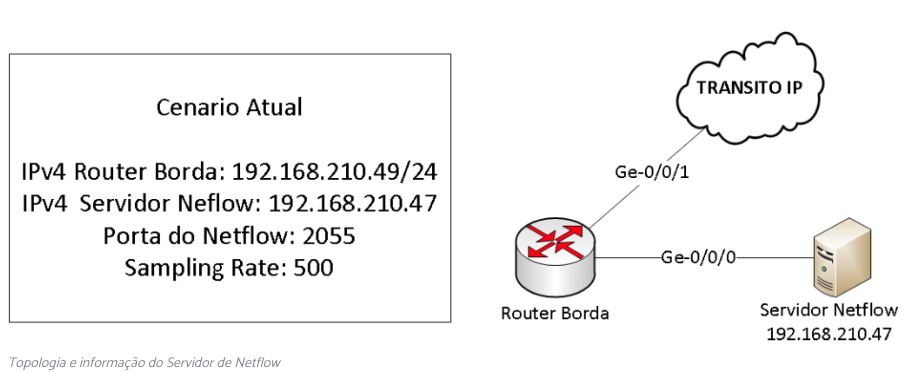
These are the steps required to configure the Nokia SR OS router to export NetFlow v9/v10 via IP Netstream
1 – Configure the NTP server
2 – Configure the cflowd parameters with the NetFlow server
3 – Configure the interface to enable NetFlow
Let’s go through the setup step by step:
1.Configuring the NTP Server
It is important to configure an NTP server because flow data uses timestamps based on the router’s time. If the router’s time differs from that of the server, the data will not be time-stamped correctly, resulting in a discrepancy in the information.
It is important that you configure at least 2 NTP servers and also your router’s timezone.
system time ntp no shutdown
system time zone BRT -03
system time ntp server 200.160.7.186
system time ntp server 201.49.148.135
2 – Configure the cflowd parameters with the NetFlow server
system security source-address application cflowd 192.168.210.49
cflowd
admin-state enable
active-flow-timeout 60
inactive-flow-timeout 15
cache-size 102400
overflow 10
template-retransmit 60
sample-profile 1 sample-rate 500
collector 192.168.210.47:2055 version 9
description "Made4Flow"
router-instance "Base"
template-set basic
3- Configure the interface to enable NetFlow
Finally, we need to enable NetFlow on the interfaces that will export it. To do this, use the following commands on each interface:
cflowd-parameters sampling unicast type interface direction ingress sample-profile 1Below is the complete configuration of the Router:
system time ntp no shutdown
system time zone BRT -03
system time ntp server 200.160.7.186
system time ntp server 201.49.148.135

system security source-address application cflowd 192.168.210.49

cflowd
admin-state enable
active-flow-timeout 60
inactive-flow-timeout 15
cache-size 102400
overflow 10
template-retransmit 60
sample-profile 1 sample-rate 500
collector 192.168.210.47:2055 version 9
description "Made4Flow"
router-instance "Base"
template-set basic
And enable the following on all interfaces:
cflowd-parameters sampling unicast type interface direction ingress sample-profile 1Detailed description
- active-flow-timeout (default 1800s) = Time interval, in seconds, for exporting active sessions; be sure to set this value the same on both the server and the router
- inactive-flow-timeout (default 15s) = The time interval, in seconds, during which no packets pass through the flow before it is considered inactive.
- cache-size (default 65536) = Maximum number of active flows in the flow cache table; adjust this value according to your needs and the device’s capacity.
- overflow (default 1%) = Percentage of entries to be removed from the Cflowd cache when the maximum number of entries is exceeded
- template-retransmit (default 600s) = Time interval for resending the flow template information
- sample-rate (default 1000) = Set this value to match the collection system to prevent discrepancies in traffic calculations
- collector = destination server
- version = Use 9 for Netflow v9 and 10 for IPFIX/v10
- router-instance (default management) = Specifies which routing instance will be used to route traffic to the collector
- template-set = specifies the template used to send data to the collector when using V9 or V10
Some additional commands for flow analysis:
show cflowd status
show cflowd collector
show cflowd collector detail
show cflowd interface