


UFISPACE – MPLS configuration
In this article, you will learn how to configure MPLS in a multi-vendor topology involving UFISPACE, Huawei, and Mikrotik equipment.
We will be using the following equipment:
- 1 – UFISPACE 9600 56DX;
- 1 – UFISPACE 9600 28DC;
- 1 – UFISPACE 9600 72XC;
- 1 – HUAWEI S6730;
- 1 – Mikrotik RB450;
Physical topology of the MPLS scenario:
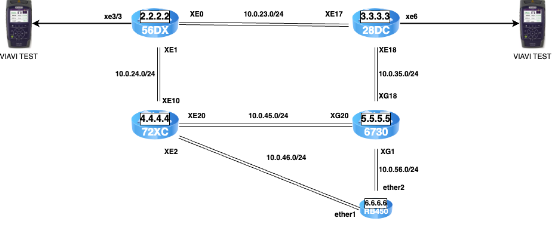
The aim is to set up MPLS LDP between all the devices, and then set up VPWS and VPLS tunnels on 56DX and 28DC, 6730 and Mikrotik to test interoperability between the vendors.
Let’s start the configurations with the UFISPACE 56DX.
Configuring the loopback interface:
interface loopback1

 ip address 2.2.2.2/32

!
Configuration of the OSPF protocol:
router ospf

 ospf router-id 2.2.2.2

 bfd all-interfaces

 network 2.2.2.2/32 area 0.0.0.0

 network 10.0.23.0/24 area 0.0.0.0

 network 10.0.24.0/24 area 0.0.0.0

!
Configuring the LDP protocol:
router ldp

 router-id 2.2.2.2

targeted-peer ipv4 3.3.3.3

  exit-targeted-peer-mode

 targeted-peer ipv4 4.4.4.4

  exit-targeted-peer-mode

 targeted-peer ipv4 5.5.5.5

  exit-targeted-peer-mode

 targeted-peer ipv4 6.6.6.6

  exit-targeted-peer-mode

 transport-address ipv4 2.2.2.2

!
Configuration of the interfaces that communicate between the equipment with MPLS:
Note: what enables MPLS on the interfaces are the “label-switching” and “enable-ldp ipv4” commands.
interface xe0

 description 28DC - XE17

 ip address 10.0.23.2/24

 mtu 9198

 label-switching

 ip ospf network point-to-point

 enable-ldp ipv4

!

interface xe1

 description 72XC - XE18

 ip address 10.0.24.2/24

 mtu 9198

 label-switching

 ip ospf network point-to-point

 enable-ldp ipv4

!
The next step is to configure the UFISPACE 28DC:
Configuring the loopback interface:
interface loopback1

 ip address 3.3.3.3/32

!
Configuration of the OSPF protocol:
router ospf

 ospf router-id 3.3.3.3

 bfd all-interfaces

 network 3.3.3.3/32 area 0.0.0.0

 network 10.0.23.0/24 area 0.0.0.0

 network 10.0.35.0/24 area 0.0.0.0

!
Configuring the LDP protocol:
router ldp

 router-id 3.3.3.3

targeted-peer ipv4 2.2.2.2

  exit-targeted-peer-mode

 targeted-peer ipv4 4.4.4.4

  exit-targeted-peer-mode

 targeted-peer ipv4 5.5.5.5

  exit-targeted-peer-mode

 transport-address ipv4 3.3.3.3

!
Configuration of the interfaces that communicate between the equipment with MPLS:
interface xe17

 description 56dx - xe0

 ip address 10.0.23.3/24

 mtu 9198

 label-switching

 ip ospf network point-to-point

 enable-ldp ipv4

!

interface xe18

 description 6730 - xge0/0/17

 ip address 10.0.35.3/24

 mtu 9198

 label-switching

 ip ospf network point-to-point

 enable-ldp ipv4

!
Now we’re going to configure the Huawei S6730.
Configuring the loopback interface:
interface LoopBack1

 ipv6 enable

 ip address 5.5.5.5 255.255.255.255

#
Configuration of the OSPF protocol:
ospf 1 router-id 5.5.5.5

 opaque-capability enable

 area 0.0.0.0

  network 5.5.5.5 0.0.0.0

  network 10.0.35.0 0.0.0.255

  network 10.0.45.0 0.0.0.255

  network 10.0.56.0 0.0.0.255

#
Configuring the MPLS protocol:
mpls lsr-id 5.5.5.5

mpls

 mpls te

 mpls rsvp-te

 mpls te cspf

#
Enable L2VPN mpls:
mpls l2vpn

#
Configuration of remote peers:
mpls ldp remote-peer 56dx

 remote-ip 2.2.2.2

#


mpls ldp remote-peer 28dc

 remote-ip 3.3.3.3

#

mpls ldp remote-peer 72xc

 remote-ip 4.4.4.4

#

mpls ldp remote-peer mikrotik

 remote-ip 6.6.6.6

#
Configuration of interfaces with MPLS enabled:
interface XGigabitEthernet0/0/1

 undo portswitch

 description Mikrotik

 ip address 10.0.56.5 255.255.255.0

 ospf network-type p2p

 mpls

 mpls ldp

#

interface XGigabitEthernet0/0/18

 undo portswitch

 description 28dc - xe18

 mtu 9198

 ip address 10.0.35.5 255.255.255.0

 ospf network-type p2p

 mpls

 mpls ldp

#


interface XGigabitEthernet0/0/20

 undo portswitch

 description op2 - xe20

 mtu 9198

 ip address 10.0.45.5 255.255.255.0

 ospf network-type p2p

 mpls

 mpls ldp

#
Finally, let’s configure the mikrotik RB450.
Configuring the loopback interface:
/interface bridge

add name=loopback


/ip address

add address=6.6.6.6 interface=loopback network=6.6.6.6

Configuração do protocol OSPF:


/routing ospf interface

add interface=ether2 network-type=point-to-point

add interface=ether1 network-type=point-to-point

/routing ospf network

add area=backbone network=10.0.56.0/24

add area=backbone network=6.6.6.6/32

add area=backbone network=10.0.46.0/24
Configuring the MPLS protocol:
/mpls ldp

set enabled=yes lsr-id=6.6.6.6 transport-address=6.6.6.6

/mpls ldp interface

add interface=ether1

add interface=ether2
ip configuration of mpls interfaces:
/ip address

add address=6.6.6.6 interface=loopback network=6.6.6.6

add address=10.0.56.6/24 interface=ether2 network=10.0.56.0

add address=10.0.46.6/24 interface=ether1 network=10.0.46.0
Now let’s see if the OSPF/MPLS neighbors have come up on the 56DX, Huawei and Mikrotik. Let’s just check out these 3 different vendors.
We started with the UFISPACE 56DX:
Verification of OSPF neighbos:
56dx# show ip ospf neighbor


Total number of full neighbors: 3

OSPF process 0 VRF(default):

Neighbor ID     Pri   State            Dead Time   Address         Interface           Instance ID

3.3.3.3           1   Full/ -          00:00:39    10.0.23.3       xe0                     0

3.3.3.3           1   Full/ -          00:00:37    10.0.32.3       xe0                     0
Verification of LDP neighbors:
56dx#show mpls ldp neighbor

Remote-Address  Local-Address   Mode          Intf-Name  Holdtime   LDP-Identifier

10.0.23.3       10.0.23.2       Interface     xe0        15         3.3.3.3:0

3.3.3.3         10.0.23.2       Targeted      xe0        45         3.3.3.3:0

5.5.5.5         10.0.23.2       Targeted      xe0        45         5.5.5.5:0

6.6.6.6         10.0.23.2       Targeted      xe0        45         6.6.6.6:0
We have verified that on the Ufispace 56DX side the OSPF and MPLS neighbors are forming correctly.
Now let’s check it out on the Huawei S6730:
Verification of OSPF neighbos:
<HUAWEI>display ospf peer brief


 OSPF Process 1 with Router ID 5.5.5.5

  Peer Statistic Information

 ----------------------------------------------------------------------------

 Area Id          Interface                        Neighbor id      State

 0.0.0.0          Vlanif10                         2.2.2.2          Full

 0.0.0.0          XGigabitEthernet0/0/1            6.6.6.6          Full

 0.0.0.0          XGigabitEthernet0/0/18           3.3.3.3          Full
Verification of MPLS neighbors:
<HUAWEI>display mpls ldp peer


 LDP Peer Information in Public network

 A '*' before a peer means the peer is being deleted.

 ------------------------------------------------------------------------------

 PeerID                 TransportAddress   DiscoverySource

 ------------------------------------------------------------------------------

 2.2.2.2:0              2.2.2.2            Remote Peer : 56dx

                                           Vlanif10

 3.3.3.3:0              3.3.3.3            Remote Peer : 28dc

                                           XGigabitEthernet0/0/18

 6.6.6.6:0              6.6.6.6            Remote Peer : mikrotik

                                           XGigabitEthernet0/0/1

 ------------------------------------------------------------------------------

 TOTAL: 3 Peer(s) Found.
We’ve seen that Huawei is also closing OSPF and LDP adjacencies.
Finally, let’s validate it in mikrotik:
Verification of OSPF neighbors:
[admin@Mikrotik] > routing ospf neighbor print

 0 instance=default router-id=5.5.5.5 address=10.0.56.5 interface=ether2 priority=1 dr-address=0.0.0.0 backup-dr-address=0.0.0.0

   state="Full" state-changes=4 ls-retransmits=0 ls-requests=0 db-summaries=0 adjacency=2d1h20m46s

   instance=default router-id=4.4.4.4 address=10.0.46.5 interface=ether2 priority=1 dr-address=0.0.0.0 backup-dr-address=0.0.0.0

   state="Full" state-changes=4 ls-retransmits=0 ls-requests=0 db-summaries=0 adjacency=1d23h25m11s
Verification of LDP neighbors:
[admin@Mikrotik] > mpls ldp neighbor print

Flags: X - disabled, D - dynamic, O - operational, T - sending-targeted-hello, V - vpls

 #      TRANSPORT       LOCAL-TRANSPORT PEER                       SEND-TARGETED ADDRESSES

 0 DOTV 5.5.5.5         6.6.6.6         5.5.5.5:0                  yes           5.5.5.5

                                                                                 10.0.35.5

                                                                                 10.0.56.5

 1 DOTV 2.2.2.2         6.6.6.6         2.2.2.2:0                  yes           2.2.2.2

                                                                                 10.0.23.2
Checking through mikrotik we see that it has also closed the adjacencies correctly.
Now that we have our scenario with mpls enabled between all the devices, let’s configure a VPWS tunnel between 56DX and 28DC.
Configuring VPWS is simple, as we’ll see below. Let’s start configuring Ufispace 56DX by following a few steps.
1 – Create the l2-circuit tunnel:
mpls l2-circuit TO_DC28 3 3.3.3.3 The number 3 in bold here is the tunnel ID, and right after that we have neighbor 3.3.3.3 which is Ufispace 28DC.
2 – Now we need to create a service-template that matches the vlan we want to transport, as in the example:
service-template VLAN10

 match outer-vlan 10

!
In this example, we are configuring VLAN 10.
It’s also possible to transport the entire port, in which case we need to create a template that contains a match-all, as shown in the example:
service-template MATCH-ALL

 match all

!
3 – The last step in closing the tunnel is to assign l2-circuit to the physical interface, which in this example will be the xe3/3 interface:
interface xe3/3

 switchport
 mpls-l2-circuit TO_DC28 service-template VLAN10 primary

!
That’s done on the 56DX, now let’s do the configuration on the 28DC device.
On the Ufispace 28DC we need to do the same steps, but only change the IP of the MPLS neighbor, which will be the 56DX with IP 2.2.2.2, as we’ll see below:
1 – Create the l2-circuit tunnel:
mpls l2-circuit TO_56DX 3 2.2.2.2 2 – Create the service-template for vlan 10:
service-template VLAN10

 match outer-vlan 10

!
3 – Assign l2-circuit to the physical interface, which in this example will be the xe6 interface:
interface xe6

 switchport

 mpls-l2-circuit TO_56DX service-template VLAN10 primary

!
We already have the configuration ready on both sides, let’s do the validations.
Verification of the 56DX virtual-circuit tunnel:
56dx#show mpls vc-table

(m) - Service mapped over multipath transport

(e) - Service mapped over LDP ECMP


VC-ID       Vlan-ID  Inner-Vlan-ID  Access-Intf   Network-Intf  Out Label  Tunnel-Label  Nexthop         Status     UpTime

3           N/A      N/A            xe3/3         -             N/A        N/A           3.3.3.3         Active    -
Checking the tunnel on the 28DC side:
56dx#show mpls vc-table

(m) - Service mapped over multipath transport

(e) - Service mapped over LDP ECMP


VC-ID       Vlan-ID  Inner-Vlan-ID  Access-Intf   Network-Intf  Out Label  Tunnel-Label  Nexthop         Status     UpTime

3           N/A      N/A            xe6         -             N/A        N/A           2.2.2.2         Active    -
As we saw above, we now have a VPWS connection between 56DX and 28DC.
Now we’re going to set up a VPLS connection using vlan 235 between 56DX, 28DC and Huawei S6730.
Configuring the vpls tunnel on the 56DX:
mpls vpls VPLS_Made4it 235

service-tpid dot1.q

signaling ldp

  vpls-peer 3.3.3.3

  vpls-peer 5.5.5.5

  exit-signaling

exit-vpls

!
Assigning the VPLS to the interface:
interface xe3/3

mpls-vpls VPLS_Made4it service-template VLAN235

- Configuração do túnel vpls no Huawei S6730:

vsi VPLS_Made4it static

pwsignal ldp

  vsi-id 235

  peer 2.2.2.2

encapsulation ethernet

#
Assigning the VPLS to the interface:
#

interface Virtual-Ethernet0/0/0.235

 dot1q termination vid 235

 l2 binding vsi VPLS_Made4it

#
Configuring the vpls tunnel on 28DC:
mpls vpls VPLS_Made4it 235

 signaling ldp

  vpls-peer 2.2.2.2

  exit-signaling

 exit-vpls

!

service-template VLAN235

 match outer-vlan 235

!
Assigning the VPLS to the interface:
interface xe6
 mpls-vpls VPLS_Made4it service-template VLAN235
  exit-if-vpls
!
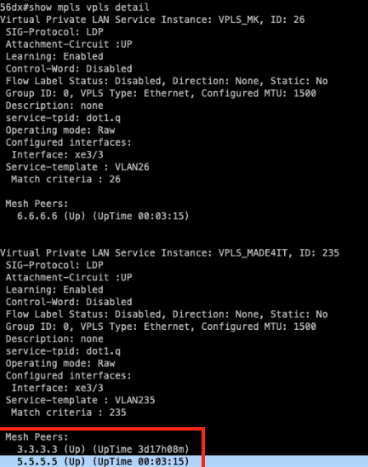
Validation of the vpls tunnel on the 56DX device. We can see that the tunnel is UP with the two peers, the Ufispace 28DC and the Huawei S6730:
We found that the VPLS tunnel was also UP on the Huawei device:

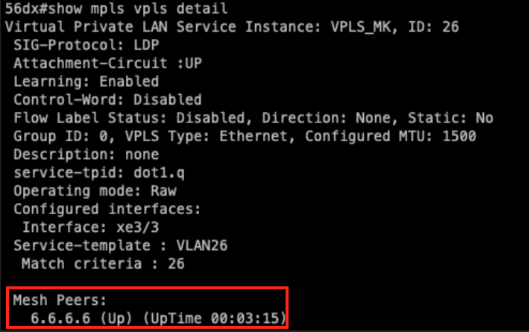
We also carried out VPLS tests between Ufispace and Mikrotik, which we can see worked normally, but we won’t go into detail about the settings so that this manual doesn’t get too long. You can see in the image that the VPLS between Ufispace 56DX and Mikrotik has been set up correctly:
Conclusion: In this article we have demonstrated how to configure MPLS on Ufispace equipment and how to interoperate it with other vendors. We’ve seen that the configuration is relatively simple and makes it a great option for the network.
In this article, you learned how to configure MPLS in a multi-vendor topology involving Ufispace, Huawei, and Mikrotik equipment. We followed a detailed step-by-step guide to configure MPLS LDP, VPWS, and VPLS tunnels, ensuring interoperability between different manufacturers.
Would you like to speak with one of our UfiSpace and IPInfusion experts? At Made4it, we specialize in these technologies and offer comprehensive configuration and support services. In addition, we are official partners of Padtec, which sells UfiSpace routers. Contact us to learn more and optimize your network with professional solutions.
See you in the next article!!
