


To better understand CGNAT, we first need to understand why we use it… Going back a bit in the history of the Internet, when the IP (Internet Protocol) was created, about 4 billion IPv4 addresses were made available for distribution; at that time, this was considered a sufficient number to meet demand.
These prefixes were used for “NAT” of internal network prefixes (RFC 1918) that did not have Internet access. NAT essentially translates the private prefix to the public prefix. This allows multiple clients to access the Internet using a single public IP address. On a small scale, with only a few private IPs being replaced by a single public one, this does not cause problems; however, on a large scale, it can lead to connection issues or a complete lack of connectivity. As the need for prefix allocation grew, the depletion of IPv4 prefixes drew ever closer to its limit.
Over time, as the internet grew, a second addressing protocol—called IPv6—was created to address the exhaustion of IPv4 addresses; there’s nothing better than having billions and billions of IP addresses available for use. However, the creation of IPv6 brought with it implementation challenges, as it required replacing equipment with devices that supported the protocol and adapting to the new protocol.
As a result, the transition of the Internet to the new IP protocol has not yet been fully completed; this has created the need for a temporary measure to address the shortage of IP addresses, without requiring changes to the Internet itself, but rather directly to providers’ networks… Consequently, the CGNAT (Carrier Grade Network Address Translation) protocol was created to facilitate this transition.
But what is CGNAT? Before going deeper, we need to better understand how it works, how does it help with address depletion? CGNAT consists of using the UDP and TCP ports of public IP addresses, dividing them between private IP blocks to establish connections with destinations on the Internet, which would be a large-scale NAT.
There are basically two types of CGNAT: Deterministic and Bulk Port Allocation. With Deterministic CGNAT, as in the previous example, we allocate a fixed number of TCP/UDP ports per public IPv4 address; that is, if we configure 100.64.0.0/24 with an outgoing route using a public /27 and pre-allocating 8,192 ports to each subscriber, we’ll have a fixed service limit of about 256 subscribers. The image below shows an example of a deterministic CGNAT table.

For this type of CGNAT, there is no minimum number of ports per connection; it can be implemented with up to 256 fixed ports per connection. However, the fewer the number of ports, the more problems we will encounter with inaccessible destinations and navigation issues. To avoid these problems, the table below shows the required number of public blocks relative to private blocks, along with the number of ports.
Deterministic CGNAT with 1 public to 16 private, with 4 thousand ports per connection.

Deterministic CGNAT with 1 public to 32 private, with 2000 ports per connection.
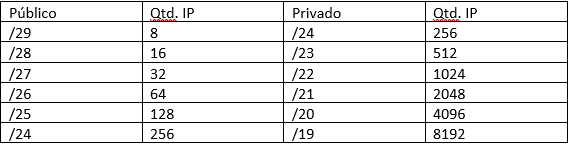
For this model, we have a page created by the Made4it team that generates a script for Mikrotik, accessible via the link made4it.com.br/cgnat/, and an article explaining how to configure it, which can be accessed by clicking here
In the Bulk Port Allocation model, the TCP/UDP ports are allocated according to the subscriber’s needs in blocks of defined size ports, the block being 256 ports and a subscriber using only one block we will save resources and with that we will be able to place many more subscribers with a public /27. The big disadvantage of this model is that we depend on generating logs of port usage and storing this information for future reference. The big disadvantage of this model is that we depend on generating logs of port usage and storing this information for future reference.

With the emergence of CGNAT, some devices have appeared that already support CGNAT configuration, such as Mikrotik, which was not specifically designed for this purpose, but whose CGNAT functionality works perfectly if properly configured. There are also several other CGNAT solutions, including A10, DANOS (Linux), Iptables (Linux), Cisco, Huawei, Juniper, NFWare, 6Wind, and others…
Until the process of transitioning the Internet to IPv6 is 100% complete, we will have to use CGNAT to work around the IPv4 shortage. If you need any assistance with implementing the protocol, regardless of the model or equipment, the Made4it team can assist you with the implementation. Please contact us via email at contato@made4it.com.br or by phone at (43) 3047-8340 or (43) 9 8485-4013.
Author: Kevin Wauters.
