


Today I’m going to show you how to configure your CPE WS5200 using Made4Graph’s TR-069.
I recommend that this be done at a workstation using a public IP address, since it will need to be approved. To do this, we’ll update some information in your CPE using the TR-069 form; we don’t want a customer to be left without internet service.
Before beginning the configuration, it is essential that there be no “NAT” of any kind on the network between the CPE and the TR-069 server; if there is, it will compromise TR-069 functionality, as stated in the protocol documentation.
Now that I’ve completed the prerequisites, let’s set up the CPE.
When you access the CPE, go to the More Functionstab, then System Settings, and TR-069

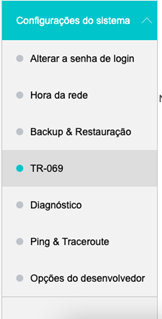
When you reach the screen shown below, we will make the following settings
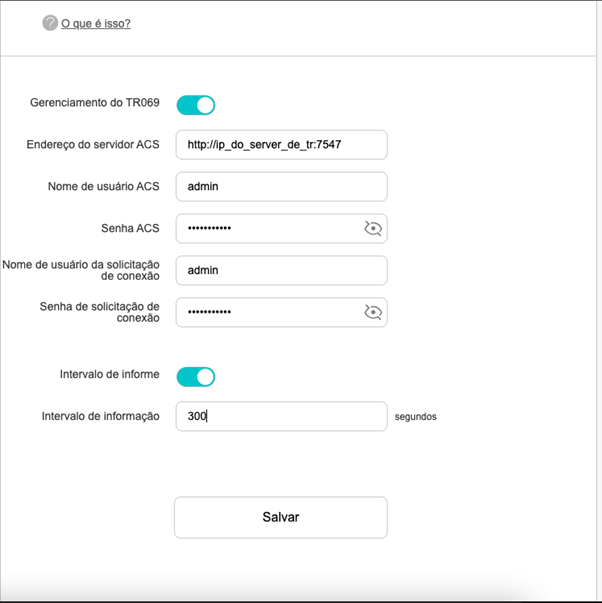
CWMP Settings:
The TR069 Management button must be enabled
The Information Interval button must be enabled
ACS server address = http://ip_do_server_de_tr:7547
ACS username = admin
ACS password = admin
Connection Request username = admin
Connection Request password = admin
Information Interval = 300
Then click Save
Shortly thereafter, the CPE should appear on made4graph, where it will be approved by our team

Some information has been redacted to keep CPE data confidential.
If you still have questions, send us a message, and we’ll help you with your CPE.
