




Did you know that it’s possible to multiply the efficiency of a single physical router and turn it into several independent routers?
That is the concept behind the Virtual-System (VS) feature of the Huawei NE40 series routers, which, incidentally, boast an impressive forwarding capacity of up to 960 Gbps.
But what does that mean in practice?
With VS, you can divide a single physical router into multiple independent virtual instances, each with its own routing system, settings, and directories. It’s like having multiple routers running inside a single one, optimizing hardware, segmenting operations, and reducing risks.
🚀 How Does Virtual-System Work?
Huawei has organized the feature into two levels:
- Admin-VS: the “master” system, with access to all unallocated interfaces and control over the other VSs.
- VS Common (VSn): independent, isolated systems designed for specific tasks, but which share hardware resources.
🔐 True isolation: Each VS has its own directory, logging system, separate alarm reports, and independent startup. This means that failures in one VS do not affect the others.
🔧 How do I create a Virtual System?
You need to follow 3 basic steps:
admin
 virtual-system VS-TESTE pvmb slot 3
 port-mode port
 description VS-TESTE
🎯 Tip: Don’t forget to adjust resource limits, such as IPv4 routes, multicast, VPN instances, and CPU load.
resource u4route upper-limit 1048576
resource m4route upper-limit 2000
resource cpu weight 5
🌐 Connecting VS to the Network
You can assign physical or logical interfaces to each VS. Here are some practical examples:
Assign a physical interface:
interface GigabitEthernet0/3/6
 undo shutdown

admin
 virtual-system vs1
 assign interface GigabitEthernet0/3/6
Assign a logical interface:
interface GigabitEthernet0/3/6.100
 vlan-type dot1Q 100

admin
 virtual-system vs1
 assign interface GigabitEthernet0/3/6.100
🔄 Switching between Admin and VS Client
After creating the VS, you can switch between them using:
switch virtual-system VS-TESTEImportant: Every VS created comes with no configuration. It is a blank environment, ready for new services.
📊 Real-World Use Cases
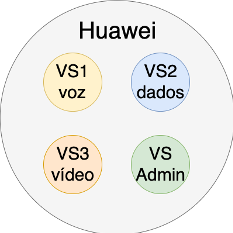
Example 1 – Breakdown by service type:
VS1: VoiceVS2: DataVS3: Video
Each service operates independently, but they all share the same hardware.
💡 Result: better organization, less noise between layers, and much greater efficiency.
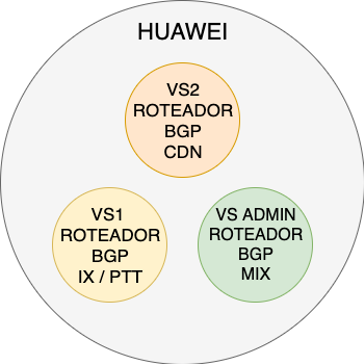
Example 2 – Sorting by content source:
Admin-VS: BGP sessions for mixed contentVS1: Content from IX/PTTVS2: CDN Content
💡 Result: granular control, less interference between traffic types, and more precise network management.
So, are you ready to virtualize your operations?
The Virtual-System feature could be a game-changer in how your ISP manages routers and segments services. With it, your hardware delivers more, with greater control and fewer risks.
👉 Do you have any questions?
Get in touch with our team. We’re ready to help your network grow.
