
Once again, ISP networks are under attack… but now the enemy comes from within.
Have you ever seen the call center explode with complaints of unexplained slowness? We’ve barely recovered from the attack that exploited vulnerabilities in the Realtek SDK where routers and ONUs were compromised and used for DDoS against third parties, and we’re already dealing with a much more dangerous and widespread threat: the AISURU/Kimwolf botnet.
This botnet mainly exploits cheap Android IPTV, SmartTV and set-top-box devices installed in users’ homes. These devices become zombies that sell home proxies and, to a lesser extent, participate in DDoS attacks on third parties. The result?
Widespread problems on several fronts:
- For the end user: constant slowness on the internet, total consumption of available bandwidth, router or ONU at the limit (CPU at 100%), generating enormous dissatisfaction and risk of churn (loss of customers);
- For the ISP: bandwidth consumed unnecessarily, overload on BNGs and CGNATs, increased use of backbone circuits, crowded call-center with complaints without a quick solution and high operating costs;
- For third parties: whose networks are attacked, crimes facilitated by anonymous browsing via a home proxy.
RESULT: frustrated customers, high support costs and reputational risk for the entire ISP. A vicious circle that nobody wants and that is growing fast.
REAL CHAOS!
Below is a compilation of questions and answers to what we already know about the subject. And at the end some tips on how to protect or mitigate yourself.
1) Where is this attack coming from and why?
According to security websites Xlab and Synthient, the actors involved in the botnet use it to make money from certain types of service:
- Private Browsing via Proxy-Residential
- Targeted Data Attacks
- Installing third-party apps
Since they have complete control of all the devices, they use the command-control servers to create browsing tunnels, install apps and launch DDoS attacks against third parties. There have also been reports of things beyond security, such as passing on images and videos of controversial subjects (political, geo-political, etc.).
2) Are there already a lot of people infected?
According to data from Synthient and XLab, which is only a fraction of communications, there were more than 12 million unique IPs (they estimate around 2 million devices). And most of them came from Brazil (~15%), followed by Vietnam, India, the USA and Argentina.

The Chinese security company XLab identified that the Kimwolf botnet had compromised between 1.8 and 2 million devices, with a strong concentration in Brazil, India, the United States and Argentina.
Image: blog.xLab.qianxin.com
3) How is the equipment infected?
You may have wondered how such equipment can be so cheap, right? That’s right.

Some images of devices that are already infected. Source: Synthient.
And you’ve also seen that they don’t go through a rigorous process of vulnerability fixing, security patches and updates/improvements. It’s a full plate in the hands of criminals.
The main way Kimwolf is infected is by exploiting a flaw in the SDKs of residential proxy applications (such as Byteconnect, IPIDEA and PYPROXY). The attacker rents a legitimate proxy from these services, uses the tunnel to “go back” through the device’s own connection and access the internal local network where he finds the ADB (Android Debug Bridge) exposed without authentication (port 5555 and similar).
In seconds, it sends remote commands, downloads the malware and installs everything.
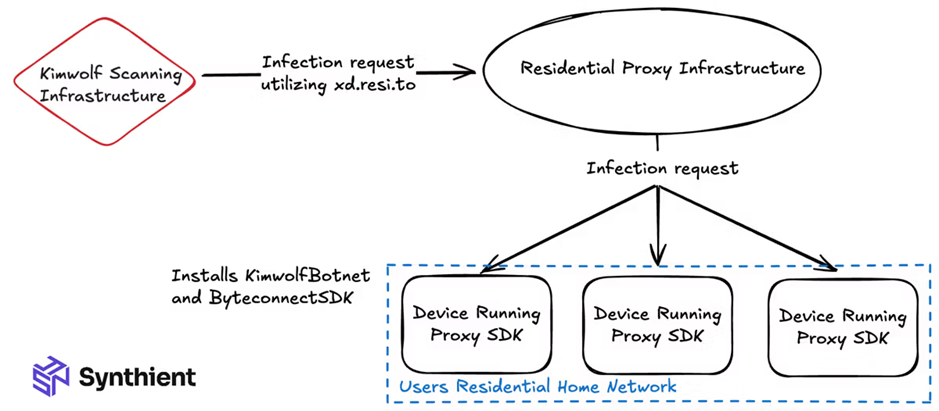
Residential proxy infection topology. Source: Synthient.
There are a number of ways in which equipment can be infected (but they all end up converging on this main mechanism):
1º) From the factory
Many devices leave the factory with proxy-residential applications pre-installed (without the user knowing), in order to monetize the bandwidth later. When the device enters the proxy pool (e.g. IPIDEA, Byteconnect, PYPROXY), the attacker exploits exactly this open port.
This is the main way of infection and this is how the Kimwolf botnet spread the most, with millions of compromised devices in months.
2º) By installing unreliable apps
Users install third-party (unverified) applications, and these silently add the proxy SDK, activating the exploit path via ADB.
3º) Vulnerable ADB/Telnet ports
Some of these IPTVs already come with ADB exposed by default. Even without the initial SDK, a small scan/brute force on ports such as 5555, 3222 or 5858 allows shell access and installation of the malware.
4) What are these proxy apps?
Basically, they are companies that sell internet browsing through their “proxies” around the world. When you buy a service from them, you set up a “VPN” to their servers, and then your browsing goes through the chosen package (for example, browsing through residential IPs in Brazil, Vietnam, etc.). They make money by charging a few dollars per GB of traffic.
But what to do?
If you want an easy answer, you won’t get it. We’re going to have to tackle this problem on several fronts. After all, unlike other botnets where the device was in the ISP’s control (the router, the UN, etc), in this case the infected equipment in 99% of cases is the customer’s own.
From an ISP perspective, we can tackle the problem in 4 actions:

Action 1: identify offending customers/equipment
On Synthient’s github (the link will be further down), there is a fraction of the list of IPs/ports used in the botnet. But they are already the first step towards identification.
Use this list and compare it with the communications in your netflow software (preferably made4flow), coming from your BNG.
With this, you will already know who is infected internally.
Action 2: mitigate / circumvent impacts
This is where technical creativity comes in.
The basic thing is to block communications through a firewall or blackhole (but these don’t last long and serve at most as a band-aid – because the botnet is just as capable of changing IPs/networks as pirate TVs are of bypassing Anatel’s blocks).
Once this is done, start thinking about more elaborate solutions.
- control of the number of connections for each client;
- dynamic flowspec rules to drop malicious traffic (made4flow can help);
- implement NGFW to deal with the universe of infected clients (we can do this automatically, huh?);
- move the infected clients to a quarantine network (which will not affect the others);
If you need help, call us!
Action 3: fix infected equipment
The recommendations of security websites are: destroy these devices. Period.
But we know the reality. You can’t destroy a customer’s device, but you can work on raising awareness. Develop a script, play your cards right and go visit your client. Show them how their network is being used to commit crimes. Show them the sites, the articles.
Try updating, resetting, removing suspicious applications.
Use the website https://synthient.com/check to show the customer that they have been caught in the botnet scans.
Action 4: implement constant monitoring
- Be aware of the security websites that deal with the subject;
- Update your block list constantly;
- Constantly, and preferably automatically, check your network for suspicious communications;
- Observe clients uploading to many different IPs – this could be a sign of compromise;
- Monitor DNS queries for suspicious domains (even if they also use DoT and ENS);
- Good netflow software can help. Count on made4flow for this monitoring.
If you’re dealing with this in your network and want to exchange ideas about filters, PBR or automatic monitoring, send me a message or comment here.
We are helping several ISPs to map and isolate these devices without extra headaches.
I WANT HELP#CyberSecurity #DDoS #Botnet #ISP #Kimwolf #InternetProvider #DigitalSecurity
Article references
[1] https://synthient.com/blog/a-broken-system-fueling-botnets
[2] https://blog.xlab.qianxin.com/kimwolf-botnet-en/#background
[3] https://synthient.com/check
[4] https://github.com/synthient/public-research/blob/main/2026/01/kimwolf/README.md
[5] https://krebsonsecurity.com/2026/01/the-kimwolf-botnet-is-stalking-your-local-network/
[6] https://krebsonsecurity.com/2026/01/who-benefited-from-the-aisuru-and-kimwolf-botnets/
[7] https://krebsonsecurity.com/2025/11/is-your-android-tv-streaming-box-part-of-a-botnet/